Email Marketing Audit: What It Is, How to Do One & How to Evaluate Results.

Ayesha Ejaz Last updated on

Email marketing remains one of the highest-ROI channels in digital marketing, but success doesn’t happen automatically.
Campaign performance can dip, deliverability issues can creep in, and what once worked may stop resonating with your audience. That’s why conducting an email marketing audit is essential.
Think of it as a health checkup for your email program. Like you wouldn’t drive your car for years without maintenance, your email marketing strategy needs periodic reviews to stay efficient, compliant, and impactful.
In this guide, we’ll walk through what an email marketing audit is, why it matters, how to perform one step by step, and provide you with an email marketing audit checklist and template to get started.
What is an Email Marketing Audit?
An email marketing audit is a structured review of your email campaigns, list management, automation workflows, content, and technical setup to ensure your strategy is effective and aligned with your business goals.
Put simply, it answers questions like:
- Are your emails reaching the inbox?
- Are people opening, clicking, and converting?
- Is your list healthy and engaged?
- Are you complying with regulations?
- Are you leveraging automation effectively?
Audits can be broad (covering every aspect of your program) or targeted (focused on deliverability, design, or segmentation). Most brands benefit from conducting a full audit at least twice a year.
Key Benefits of Conducting an Email Marketing Audit
An audit is not just about fixing problems—it’s about uncovering hidden opportunities and making sure your email program is future-proof. Let’s break down the key benefits in detail:
Boost Engagement Metrics.
Engagement is the lifeblood of any email program. If your subscribers aren’t opening, clicking, or converting, your efforts (and budget) are wasted.
An audit helps you spot why engagement might be slipping—maybe your subject lines are stale, your CTAs aren’t compelling, or your emails aren’t optimized for mobile.
Analyzing campaign trends allows you to identify patterns and fine-tune elements like send time, personalization, and frequency to maximize response rates. This not only increases engagement but also builds stronger subscriber relationships.
Strengthen Deliverability.
Even the best-written email won’t make an impact if it doesn’t land in the inbox. Deliverability is often overlooked until it becomes a major issue, but minor missteps like sending too frequently, ignoring spam complaints, or lacking proper authentication protocols can hurt your sender reputation.
An audit shines a light on deliverability problems early. It helps you check for domain authentication (SPF, DKIM, DMARC), evaluate bounce rates, and test inbox placement. Catching these issues before they escalate ensures your campaigns consistently reach your audience.
Improve List Health
A bloated list with disengaged or invalid subscribers can drag down performance and even trigger spam filters.
An audit forces you to look at your database's quality—not just the size. Are a large percentage of your contacts inactive? Are you paying for subscribers who haven’t opened in a year? By cleaning and segmenting your list, you’ll improve engagement rates, save on platform costs, and ensure your messages reach people who want to hear from you.
For e-commerce and high-volume senders, this can also mean a more accurate revenue forecast from email.
Stay Compliant
Email marketing is heavily regulated across different regions, think GDPR in Europe, CAN-SPAM in the U.S., and CASL in Canada.
Fines for non-compliance can be steep, and unintentional mistakes (like missing an unsubscribe link or not storing consent properly) can put your brand at risk. An audit includes reviewing your data collection methods, consent processes, and opt-out mechanisms. This protects you legally and strengthens subscriber trust, which is crucial for long-term success.
Increase ROI
Email remains one of the most cost-effective marketing channels, often boasting $30–$40 return for every dollar spent. But without an audit, you might not be leveraging it fully. By identifying which campaigns or workflows drive the most revenue, you can double down on winners and reduce underperformers.
For example, if abandoned cart emails outperform newsletters, your audit might reveal that shifting resources into cart recovery could yield bigger returns. Aligning your audit findings with overall business objectives ensures every dollar invested in email is working harder.
Gain Clarity
Marketing teams often get caught in the cycle of “sending for the sake of sending.” An audit breaks that cycle by offering a fresh, objective perspective on your strategy.
It helps you step back, assess what’s truly working, and pinpoint where you’re wasting time or money. The clarity gained from an audit doesn’t just benefit the email team—it provides insights your entire marketing department can use.
Whether it’s proving the value of email to leadership, guiding budget decisions, or setting realistic growth targets, the transparency you gain is invaluable.
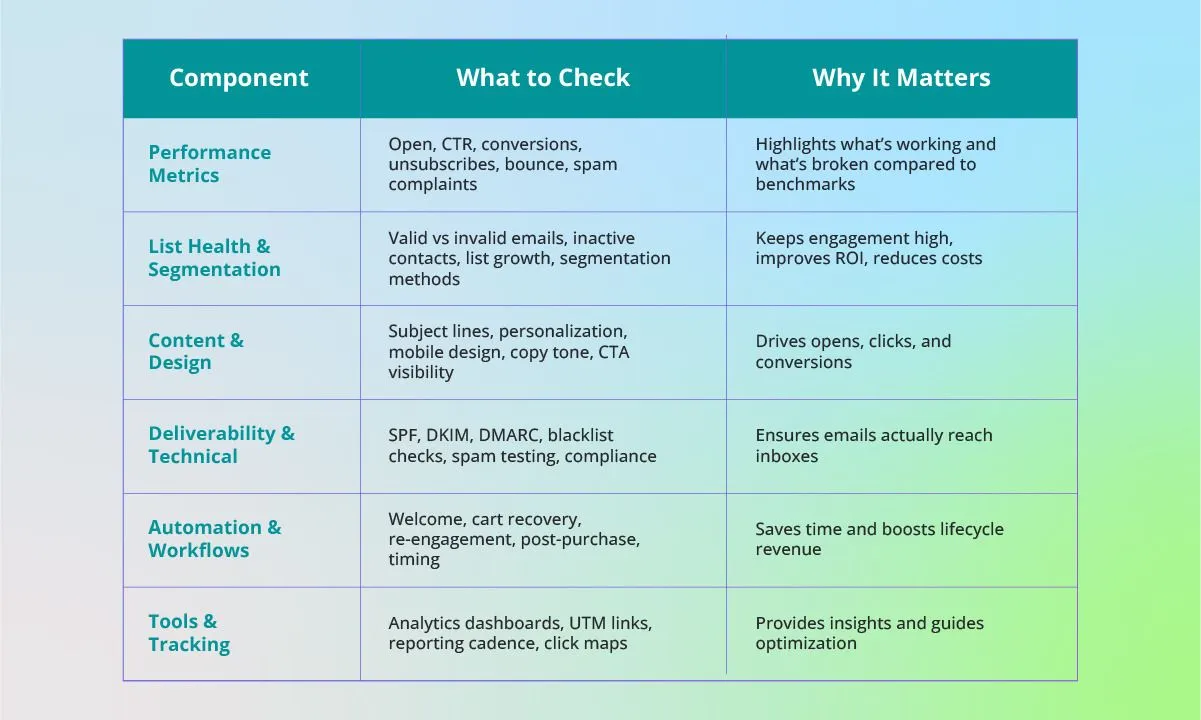
Components of an Email Marketing Audit
How to Perform an Email Marketing Audit (Step-by-Step Process)
Auditing your email program doesn’t need to be overwhelming. You can identify strengths, fix weaknesses, and build a strategy that consistently delivers results by breaking it into clear, actionable steps.
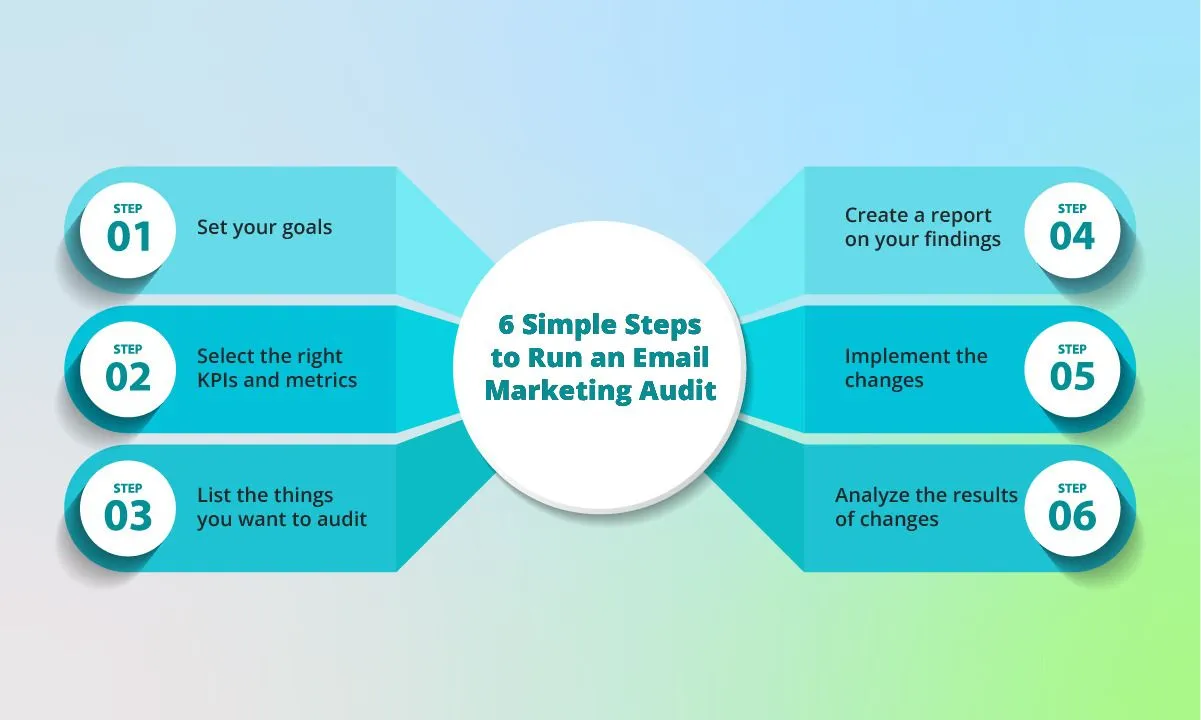
Step 1: Define Goals & Scope
Before diving into data, clarify why you’re running the audit. Goals provide direction and help measure success.
- Full audit: Involves reviewing everything—list health, segmentation, workflows, templates, deliverability, compliance, and reporting. Ideal for teams that haven’t audited in over six months.
- Focused audit: Zeroes in on specific pain points, such as declining open rates or poor automation performance. This is useful if you’ve already identified one weak area.
Set SMART KPIs (Specific, Measurable, Achievable, Relevant, Time-bound). Examples:
- “Increase open rates by 10% within 90 days.”
- “Reduce bounce rates below 2% by the next quarter.”
- “Boost abandoned cart email revenue by 15% in six months.”
Clear goals prevent “audit overwhelm” and allow you to track the impact of your improvements.
Step 2: Assemble Your Audit Team
Email marketing isn’t a solo activity—multiple perspectives ensure no stone is left unturned.
- Marketing/Content team: Reviews strategy, copy, personalization, and segmentation.
- Designers: Audit email layouts, mobile responsiveness, and branding consistency.
- IT/Tech support: Validate authentication (SPF, DKIM, DMARC), sender domains, and integration issues.
- Compliance/Legal: Check GDPR, CAN-SPAM, CASL, or other local regulations to avoid penalties.
- Data analysts: Benchmark performance, measure ROI, and uncover patterns in engagement.
One person may wear multiple hats in smaller businesses, but it’s still worth looking at the audit from all these angles.
Step 3: Choose Tools & Gather Data
The right tools save hours of manual work and give deeper insights.
- Email Service Provider (ESP) reports: Platforms like Mailchimp, HubSpot, or Klaviyo already provide open rates, CTRs, unsubscribes, and revenue tracking.
- Deliverability tools: Services like GlockApps, Postmark, or MailTester help check inbox placement, spam triggers, and sender reputation.
- Analytics tools: Google Analytics or Looker Studio for UTM tracking and campaign ROI.
- Engagement data: Pull at least six months (ideally 12) of campaign history to identify real trends, not just short-term fluctuations.
The better your data set, the more accurate and actionable your audit will be.
Step 4: Audit Using the Components Checklist
Now it’s time to roll up your sleeves and dive into the details. Use a structured checklist (like the scorecard we built earlier) to evaluate:
- Performance metrics (open, CTR, conversions, unsubscribes, spam complaints)
- List health & segmentation (active vs inactive, growth rate, segmentation strategy)
- Content & design (subject lines, personalization, CTAs, templates, mobile responsiveness)
- Deliverability & technical setup (SPF/DKIM/DMARC, reputation, spam tests)
- Automation & workflows (welcome series, cart recovery, re-engagement flows)
- Compliance (GDPR, CAN-SPAM opt-ins, unsubscribe processes)
- Reporting & tools (dashboards, UTM setup, tracking cadence)
Document findings in a central place (spreadsheet, project management tool, or the scorecard template).
Step 5: Analyze & Prioritize
Not all issues uncovered are equally urgent. Categorize fixes to avoid wasting resources:
- High impact, low effort → Quick wins. Examples: fixing broken CTAs, adding alt text, updating preview text.
- High impact, high effort → Strategic projects. Examples: migrating ESPs, redesigning all templates, rebuilding automation flows.
- Low impact → Nice-to-have improvements. Examples: tweaking font sizes, experimenting with emojis in subject lines.
This framework ensures your team tackles the most valuable fixes first, keeping momentum and showing results early.
Step 6: Create an Action Plan
Turn audit results into a roadmap for improvement.
- List concrete tasks (e.g., “Clean 3,000 inactive contacts,” “Implement double opt-in,” “Redesign cart abandonment sequence”).
- Assign ownership so it’s clear who is responsible.
- Set deadlines to prevent procrastination and keep accountability.
- Prioritize based on effort vs impact using the earlier classification.
Pro tip: Visualize your plan in a project management tool (Asana, Trello, Notion) so progress is trackable.
Step 7: Test, Monitor, and Iterate
An audit isn’t the finish line—it’s the start of a continuous improvement cycle.
- Run A/B tests on subject lines, CTAs, design layouts, and send times to validate assumptions.
- Monitor improvements over 30–90 days to see which changes drive results.
- Re-audit periodically (quarterly mini-audits, annual full audit) to catch new issues before they snowball.
By embedding testing and iteration into your workflow, your email marketing stays agile, effective, and aligned with business goals.
Email Marketing Audit Checklist & Template Examples
Use this scorecard to evaluate each area of your email marketing program. Rate each category from 1–5 (1 = needs major improvement, 5 = excellent). Add notes under each section to capture findings and next steps.
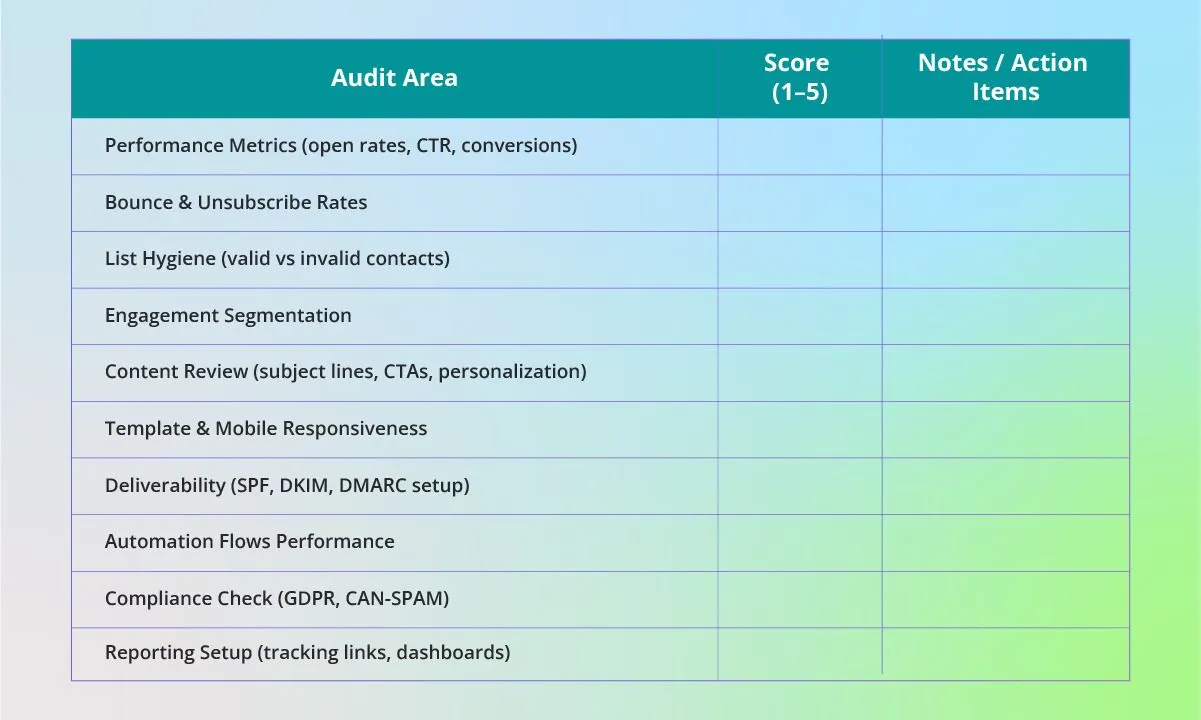
Overall Score: ______ / 50
Interpretation:
- 40–50: Strong program, only minor tweaks needed
- 30–39: Healthy program but room for optimization
- 20–29: Significant issues, prioritize fixes
- <20: Critical improvements required immediately
Tools & Services to Help with Email Marketing Audits
The right tools can make your audit faster, more accurate, and less overwhelming. Depending on your budget, there are plenty of free and paid options:
Free Tools
- Mail-Tester → Quickly checks if your email lands in inboxes or spam, while flagging deliverability issues like blacklisting.
- Google Postmaster Tools → Free from Google, helps track sender reputation, spam complaints, and authentication status (SPF/DKIM/DMARC).
- Mailmodo Templates → Offers ready-to-use templates and checklists that simplify parts of the audit process.
Paid Tools
- Litmus → Provides design previews across multiple devices and email clients, ensuring templates look polished everywhere.
- GlockApps → Advanced deliverability testing tool that tracks inbox placement, spam folder placement, and domain/IP reputation.
- Validity → Specializes in list validation, engagement scoring, and identifying risky contacts that hurt your deliverability.
ESP Dashboards
Most Email Service Providers (ESPs) like Mailmunch, HubSpot, Omnisend, Klaviyo, and Mailchimp already have built-in analytics. They’re often enough for small to midsize teams and include open rates, CTRs, unsubscribes, and even revenue attribution for e-commerce.
Hiring Services
If resources are limited or your team lacks expertise, consider outsourcing to email marketing audit services. Specialized consultants or agencies can perform deep-dive audits, uncover technical gaps, and provide actionable roadmaps. While more expensive, this option is ideal for companies preparing for large-scale campaigns or migrations.
Common Mistakes & Pitfalls to Avoid
Even the most seasoned marketers can fall into traps when running an audit. Here are some common mistakes—and how to avoid them.
1. Focusing Only on Vanity Metrics
It’s tempting to obsess over open rates because they’re easy to measure. But high opens don’t always translate into revenue. The campaign is unsuccessful if subscribers open but don’t click or convert. During your audit, balance “vanity metrics” (opens) with meaningful metrics like CTR, conversions, and revenue per email.
2. Skipping Deliverability Checks
You can have great content, but none of it matters if your emails don’t make it to the inbox. During their audit, many marketers forget to check SPF, DKIM, DMARC, and sender reputation. This oversight leads to spam folder placement and missed opportunities. Make deliverability checks a non-negotiable step in every audit.
3. Making Too Many Changes at Once
An audit can uncover dozens of issues, and the urge to fix everything immediately is strong. But if you overhaul subject lines, workflows, and templates simultaneously, you’ll never know which change moved the needle. Instead, prioritize fixes and test improvements step by step. This makes optimization measurable and sustainable.
4. Ignoring Subscriber Feedback and Complaints
Data tells part of the story, but your subscribers are the best source of truth. Many marketers ignore unsubscribes, spam complaints, or direct replies when auditing. These signals often highlight issues like frequency, relevance, or tone. Incorporate qualitative feedback alongside quantitative data for a complete picture.
5. Treating an Audit as a One-Time Task
An audit isn’t a “set it and forget it” activity. Many teams run a review once a year, then let problems pile up again. Instead, treat your audit as a regular maintenance cycle. Run mini-audits quarterly, with a full audit at least once a year, to keep your email program healthy and competitive.
Audit for Specific Use Cases & Business Sizes
Not all audits are created equal. Tailor your approach based on your business model and scale.
Ecommerce Email Marketing Audit
Extra areas to review:
- Abandoned cart flows → Are reminders timely and persuasive?
- Product recommendations → Are they personalized and accurate?
- Cross-sell & upsell campaigns → Do follow-ups encourage repeat purchases?
- Loyalty or rewards programs → Are emails engaging members and driving return sales?
Midsize Business Email Marketing Audit
Considerations for larger teams:
- CRM & sales tool integration → Ensure email data syncs with customer databases.
- Workflow scalability → Can automation handle thousands of new leads?
- Data governance → Protect data privacy and stay compliant with GDPR or local laws.
- Multiple stakeholders → Make sure audits address needs across marketing, sales, and IT.
Free Email Marketing Audit: What You Get, What You Should Expect
Some agencies offer “free audits” to attract potential clients. Here’s what they usually include:
- A basic performance review (open, CTR, unsubscribes).
- A high-level deliverability check (domain reputation, spam placement).
- Quick recommendations for easy fixes.
Limitations: Free audits rarely go deep. They won’t provide tailored strategies, technical troubleshooting, or full workflow analysis. In fact, you can replicate most free audits yourself using the checklist we built earlier.
Email Marketing Audit Report: How to Present Your Findings.
Your audit shouldn’t just live in a spreadsheet; it should end with a clear, structured report that stakeholders can act on. A strong report includes:
- Executive Summary → A snapshot of key wins, top problems, and recommendations.
- Findings by Category → Breakdowns for metrics, list health, design, deliverability, etc.
- Prioritized Recommendations → Ranked by impact and effort so teams know where to start.
- Before vs After Metrics → Show progress with benchmarks and expected outcomes.
- Visuals → Use charts, graphs, and heatmaps to make data easy to digest.
This report doubles as both a decision-making tool and a progress tracker for the next audit cycle.
How Often Should You Run an Email Marketing Audit?
The right cadence depends on your business type and sending volume:
- Quarterly → High-volume senders, ecommerce brands, or businesses with frequent promotions.
- Biannually → Midsize businesses with steady campaigns and moderate list growth.
- Annually → Smaller teams with low send volume or limited resources.
Best practice: Run a mini-audit before major campaigns (e.g., Black Friday, product launches). This ensures everything—templates, lists, and deliverability—are optimized when the stakes are high.
Conclusion
Email marketing may be one of the oldest digital channels, but it continues to deliver unmatched ROI, when managed properly. An email marketing audit is the best way to keep your campaigns healthy, compliant, and effective.
Start simple: download a template, score your program, and fix one high-impact issue today. With regular audits, your emails won’t just reach inboxes—they’ll drive meaningful engagement and revenue.