Interactive Emails: Engaging Subscribers Like Never Before

Brooke Webber Last updated on
The typical email comes with a block of text either selling a product or pushing an offer that feels more like a monologue than a conversation. That might have been effective in the past, but it's no longer the case.
Subscribers want more than passive reading. They want to be part of the experience. If your emails don’t make them feel involved, they’ll tune out, or worse, mark you as spam and blacklist your domain for being a constant nuisance.
And that’s where interactive emails come in. They make your subscribers a part of the interaction and boost engagement. Engaged subscribers are more likely to convert or become loyal followers.
In this article, we’ll share some tips to build these emails and keep your campaigns performing at their best.
6 Interactive elements to boost your email engagement
Interactive elements turn your email into a two-way conversation channel, contrary to the traditional email marketing approach. Let’s see which ones you can include in your campaigns below.
- Introduce simple in-email surveys
Email tools like Gmail and Outlook enable users to directly embed polls or surveys using third-party platforms, such as Stripo. However, it’s still basic, and the survey setting has only a few options.
Of course, that’s more than enough to collect limited information on how your subscribers feel about a topic, product, trend, or offer. For instance, you might ask:
- Do you prefer Product X or Y?
- Would you attend a webinar this Friday?
- Should we bring back this collection?
Besides the information you get, you’ve also gotten them engaged in a conversation, which you can follow up on later.
- Add countdown timers
Countdowns stir urgency and the fear of missing out (FOMO), and they are one of the fastest ways to get interested email subscribers to take action or engage with your content. You can embed countdown timers on Mailmunch inside your emails using the campaign editor.
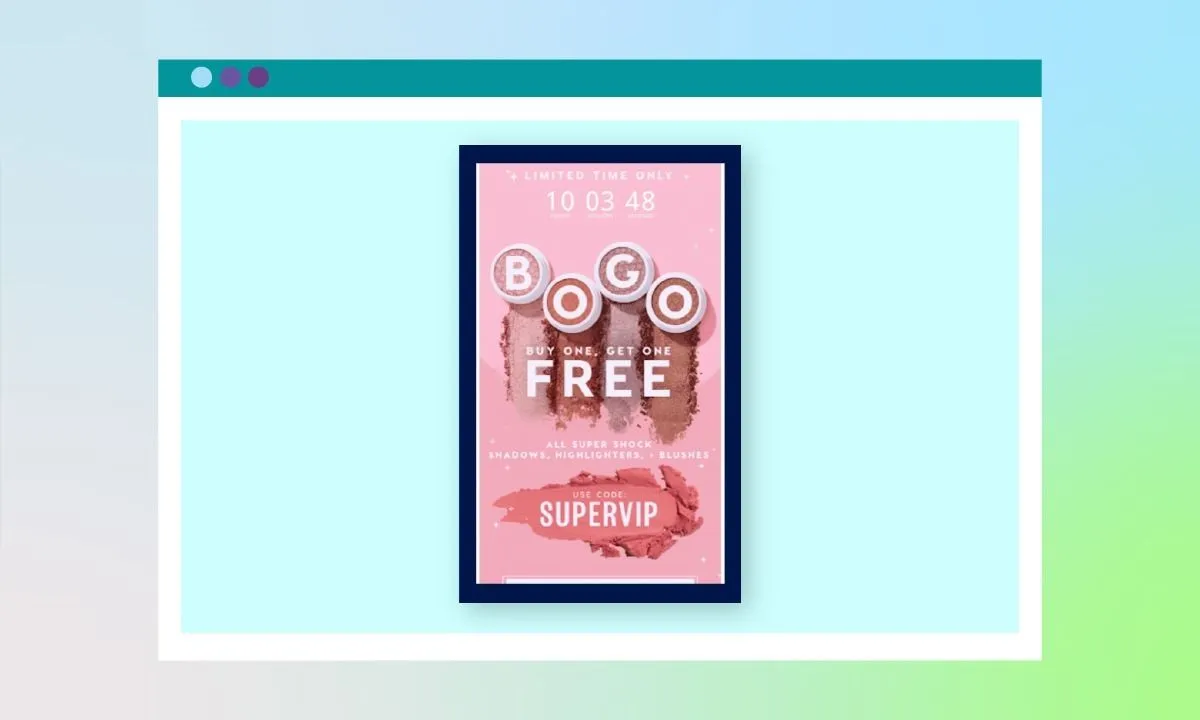
An alternative is to use a looping GIF that displays a fixed countdown. But if you want a real-time GIF, you can try tools like Sendtric and easily add the codes generated in your Mailmunch campaign.
- Insert clickable image carousels for product showcase
Speaking from the ecommerce perspective. You have a ton of products you want to show your subscribers, but most wouldn’t take a step beyond their inbox. So, adding a link to your products won’t really work.
In this case, you can directly integrate clickable image carousels inside your email. The first step is to use tools like Stripo to create the clickable carousels. Then import them into the HTML editor of your campaign editor on Mailmunch.
You can use carousels to display different shades of a fashion dress while adding a poll to ask your subscribers for their best choice.
- Use an Accordion to keep things short
If your niche requires sending long emails, you need to make them as scrollable as possible. And that’s where you’ll need Accordion. Accordion lets you hide sections of text under clickable headings. When a subscriber clicks or taps, the hidden content expands. They can also opt to skip certain headings and proceed to the next one.
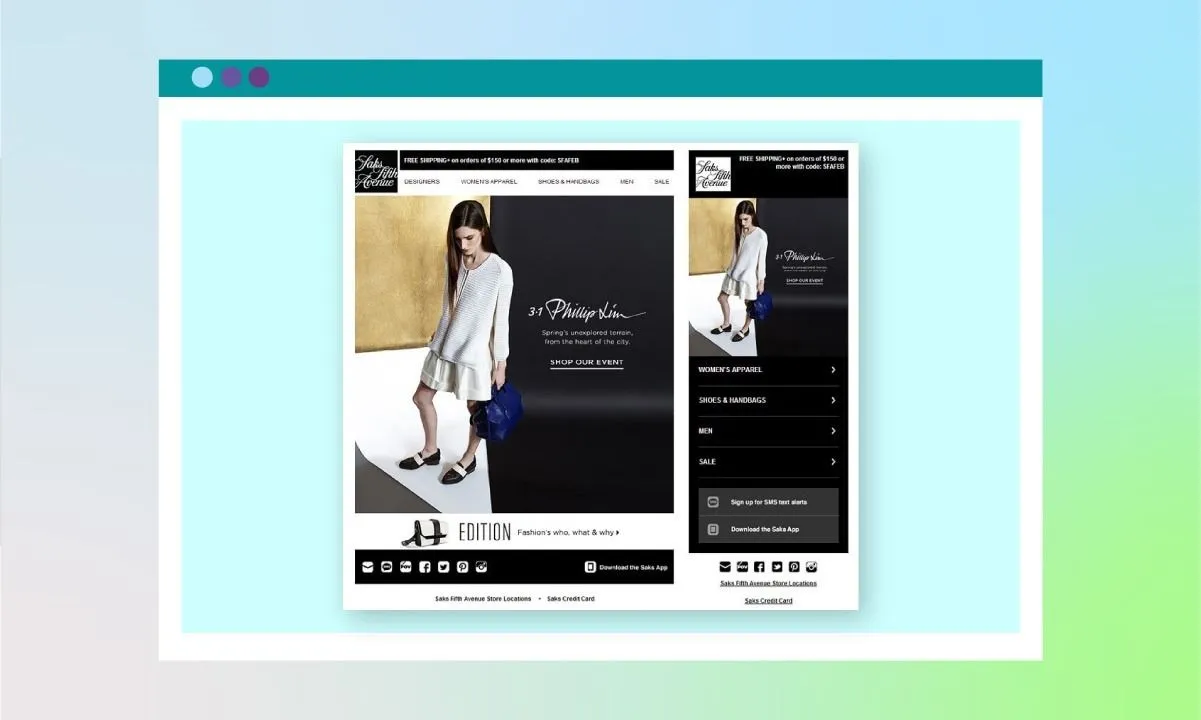
To use accordions, you’ll need Stripo. Select templates with an accordion design and import them into your Mailmunch campaign editor to fill in your details.
- Play around with GIFs and Offer reveals
If your audience is the casual type, it doesn’t hurt to add some GIFs or even stickers. Use them as icebreakers when your texts are getting too long or when you need to boost their emotions. However, don’t overuse any. Just one or two, depending on the length of your email, is enough.
Offer reveals are another way to encourage participation. You can add a clickable image with a message like “Tap to reveal your offer” or “Scratch to unlock.” This creates a mini sense of mystery and reward. While true scratch-to-reveal features need AMP or advanced coding, you can simulate it with a clickable image that links to a hidden landing page or special deal.
- Create conversations with recipients
Simple things resonate with people really fast. In one corner of your emails, throw in a random, funny-looking image of your pet. Perhaps a cat, dog, or an animal universally loved. It could be the image of your workspace setup, or even your Niece’s image, like Katelyn Collins did in her marketing email below.
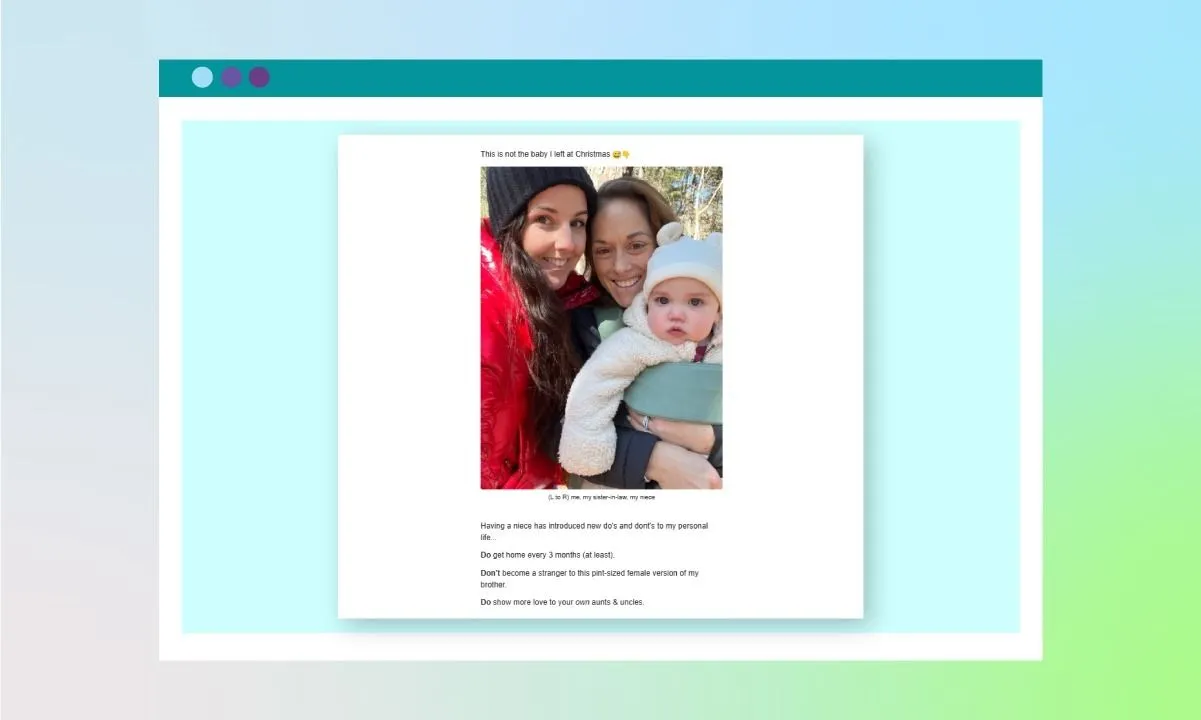
Of course, the interaction is only complete if they respond in kind. So if you share a fun pet image, you can nudge them to send theirs too. If they’re pet lovers, chances are they’ll be excited to join in and share back. This makes your emails feel personal, creates a loop of engagement, and turns it into a conversation rather than a campaign.
Email tips to build a truly interactive email
Building engagement with interactive emails goes beyond stickers and sending pet images. The relevance and value of your content determine whether subscribers will engage or not. So, here’s what to do:
- Build the mailing list yourself
Add all the interactive elements you are familiar with. If your list is a recycled third-rate dump from some shady site or agency, it’s going to take sweat and blood to get recipients to lift their fingers. You need a list of subscribers who knew you before they ever joined. That makes it easy to engage them even with the slightest effort.
To create a warm email list:
- Lift the email addresses of your previous and existing customers from the database
- Send out forms to relevant communities to join your mailing list
- Add newsletter opt-ins to your website, landing pages, and blog posts
- Offer lead magnets (like checklists, free guides, or discounts) in exchange for email sign-up
- Collect emails during webinars, workshops, or events you host or sponsor
- Encourage social media followers to join your list with exclusive email-only content
- Use referral incentives to get your subscribers to invite others
You can also run targeted ads directing people to your email sign-up form. It’s faster, but let’s be honest, paid ads can get expensive depending on your audience and goals. If you're running lean, consider applying for small business grants, exploring low-interest credit options, or looking into regional support programs, such as California debt relief, to ease the financial pressure.
- Know what tips your subscribers over
Stickers and flashy elements might draw some people in, but for others, they’re an instant turnoff. So, before throwing every interactive content at your list, know what actually works for them.
To do that, first start with the information you have on your subscribers, based on the source from which they joined.
- Let’s take leads lifted from your company’s database as an example. Using your past interactions with them, you can determine which leads are more receptive to casual, relaxed messaging and which ones prefer a more structured, professional tone.
- People joining your list from social media are also more likely to prefer playful stickers, GIFs, carousels, and various interactive elements.
It’s not only interactive elements that spur conversations. The type of topics you engage your subscribers in also matters.
- For instance, subscribers from your blog may respond better to behind-the-scenes stories or how-to guides.
- On the other hand, those from sales funnels or ad campaigns might prefer limited-time offers or quick value pitches.
Additionally, compare your competitors’ website traffic to see which pages receive the most attention. Identify the topics that high-performing pages cover, then recreate them into engaging, relevant emails tailored to your own subscribers.
- Make segmentation your best buddy
If you’re catering to diverse audiences, sending the same content type and interactive elements might not meet each group’s needs. This can result in poor engagement and more unsubscribes.
Segment your list based on behavior, interests, or purchase history. Using demographics to segment is a good idea, but it’s not recommended, as people with similar demographics may not necessarily share the same interests.
You can also run A/B testing to know what works for everyone on your list. Segment your audience based on the outcome and target them appropriately.
- Offload repetitives and focus on creatives
Creating interactive emails is a significant amount of work, from building an active list and segmenting it to crafting the content, sending them out, and addressing responses. Things can get really bulky if you’re handling all the processes alone, especially if you're running solo or building a newsletter as a freelancer.
To truly scale your interactive email efforts without burning out, consider delegating to a skilled virtual assistant. They can help handle time-consuming tasks, such as content research, data entry, scheduling, and A/B test setup, while you focus on creating interactive email strategies that work.
- Make your newsletter a valuable product
According to Statista, over 376 billion emails were sent in 2025, with approximately 4.5 billion active email users. Do the math, and the average user receives over 80 emails per day. In that kind of inbox noise, your newsletter can end up becoming just another message if it doesn’t strike a chord, even if you insert all the interactive elements we’ve talked about.
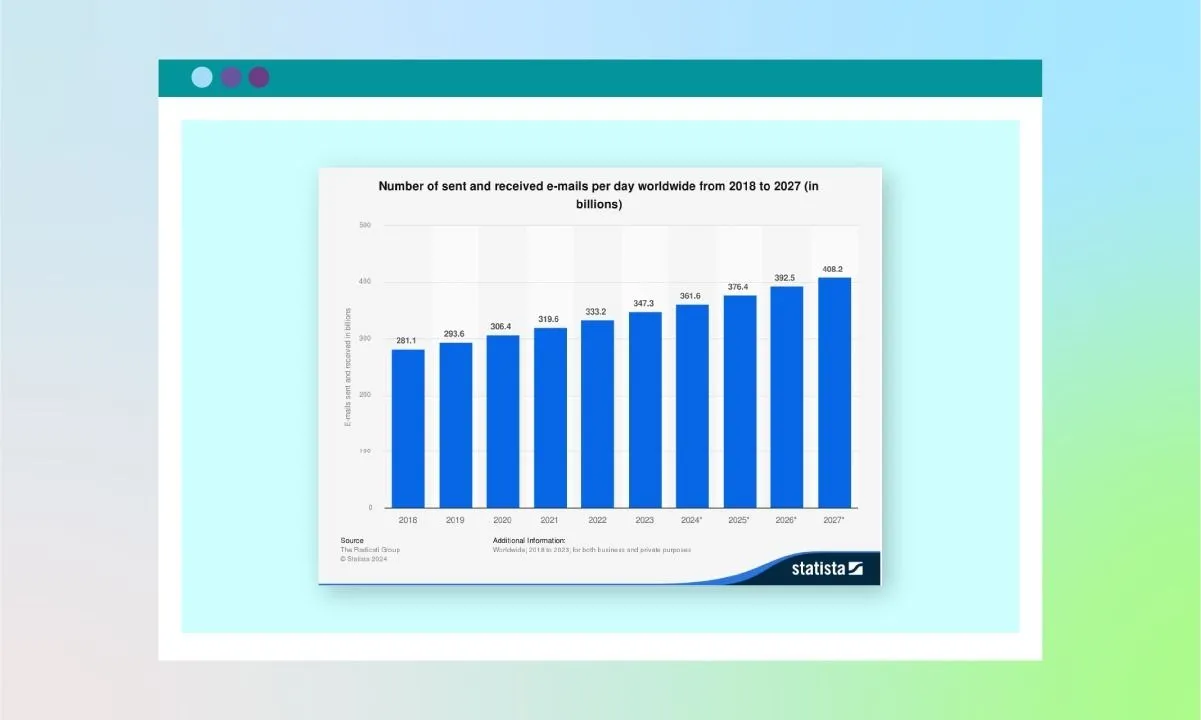
So, turn your newsletter into a product people are willing to pay for with their time and attention. Provide instantly helpful tips. Link to job openings if your newsletter is filled with tons of freelancers. Mention a new but complementary tool that you don’t offer if it helps your list. Just bring in something that wants them to look forward to the next email.
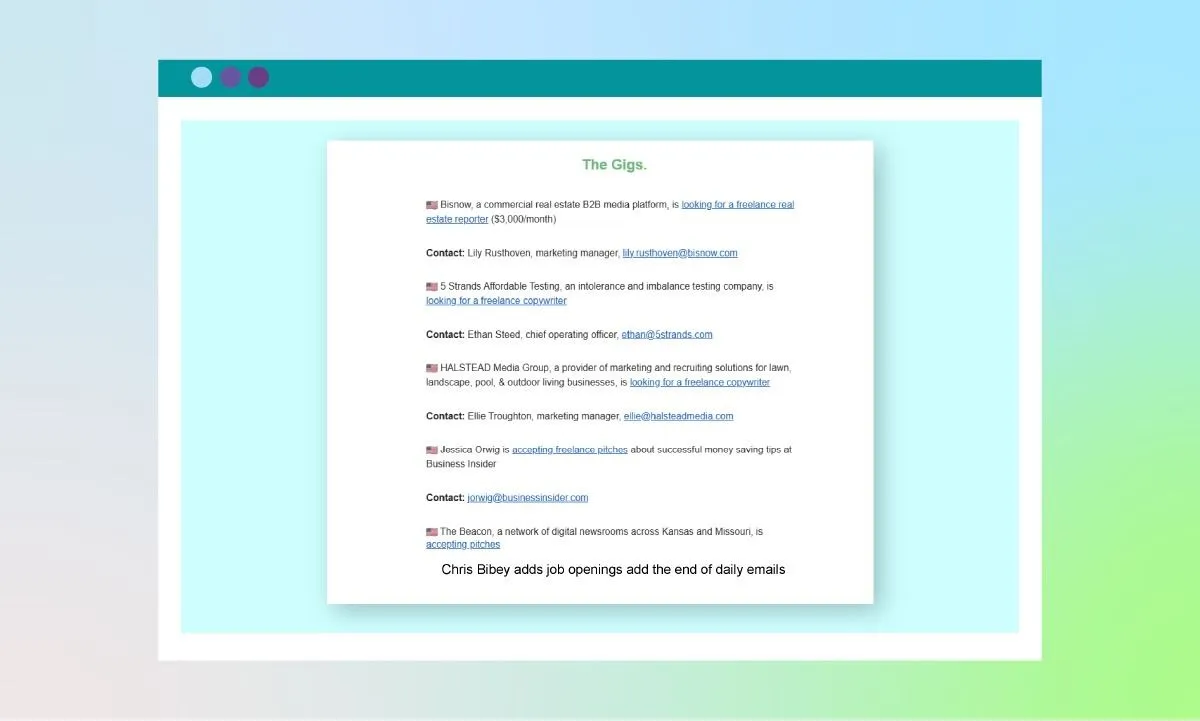
Chris Bibey adds job openings add the end of daily emails
Wrapping up
Email marketing remains as profitable as before. However, the effectiveness of this approach for your brand depends on how engaged your subscribers are. And the best way to encourage engagement is to make your emails as interactive as possible.
To achieve this, introduce simple polls to gather recipients’ thoughts, add countdown timers, insert a clickable image, use an accordion to keep content concise, and experiment with GIFs. Beyond the elements, build an interactive mailing list, find out which topics resonate with your subscribers, and make segmentation your ally.
Additionally, offload repetitive tasks to focus on creatives and transform your newsletter into a valuable product.