Responsive Email Design: Best Practices, Tools, and Tips for High-Converting Campaigns

Ayesha Ejaz Last updated on

Let’s be honest—no one likes squinting at an email that doesn’t fit their screen. In a world where nearly everyone checks emails on their phones (often before getting out of bed), having emails that actually look good on mobile is a non-negotiable. That’s where responsive email design comes in.
This approach ensures your emails automatically adjust to fit any screen size—a phone, tablet, or desktop. Instead of alienating half your audience with hard-to-read layouts and awkward formatting, responsive design makes your message easy to engage with anywhere, anytime.
In this guide, we’ll demystify responsive email design, walk you through best practices, show you awesome tools, and even highlight real examples to inspire your next campaign. Whether you’re just getting started or looking to fine-tune your approach, this guide has you covered.
What Is Responsive Email Design?
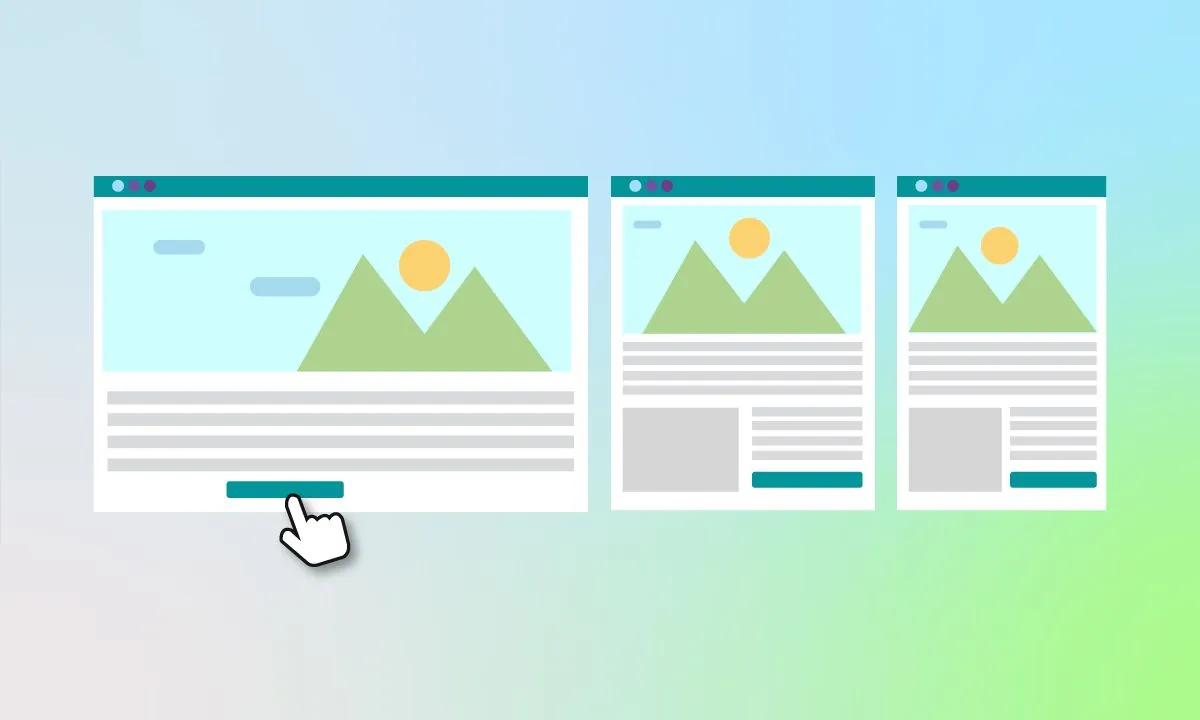
Think of responsive email design like a smart, flexible layout that knows how to behave on different screens. It uses tools like fluid grids, media queries, and scalable images so your emails can adapt to a phone, tablet, or desktop without breaking a sweat.
Responsive vs Fluid vs Hybrid Design (Without the Jargon)
- Responsive: The gold standard. Uses media queries to tailor the layout for each screen size.
- Fluid: It stretches and shrinks based on screen width but doesn’t shift the layout much.
- Hybrid: A one-size-fits-most approach. Easier to build, works okay across platforms, but not as fancy.
So, How Does It Actually Work?
Responsive emails rely on CSS media queries—rules that tell your email how to look on different devices. For example:
- Small screens (phones): Stack content vertically.
- Medium screens (tablets): Slight layout changes.
- Large screens (desktops): Go full layout mode.
These rules kick in depending on the screen’s breakpoint (e.g., 480px, 768px, etc.). Combine that with scalable images and flexible tables, and your email is now adaptable across devices.
Simple Definition
Responsive email design = emails that automatically look great on any device. No pinch-and-zoom, no broken layouts—just smooth, readable content.
Why Responsive Email Design Is Essential for Marketers
If your emails don’t work well on mobile, you’re basically turning away half your potential audience. But let’s dig deeper.
Why It’s a Big Deal
- User experience: You want your readers to actually enjoy opening your emails—not dread it.
- Better engagement: Clean design = more clicks.
- Wider reach: Mobile is king. Ignore it, and you’re missing out.
Responsive design isn’t a luxury anymore—it’s table stakes. It’s about meeting your audience where they are, and where they are is on their phones.
Mobile-Responsive Email Design: A Must, Not a Maybe
The term mobile-responsive email design gets thrown around a lot, but here’s what it really means: designing with mobile in mind first, then adapting for larger screens. It’s easier, smarter, and honestly, it just makes sense.
Why go responsive? Your competition already is, mobile traffic is exploding, and customers expect better.
Responsive Email Design vs Hybrid Email Design
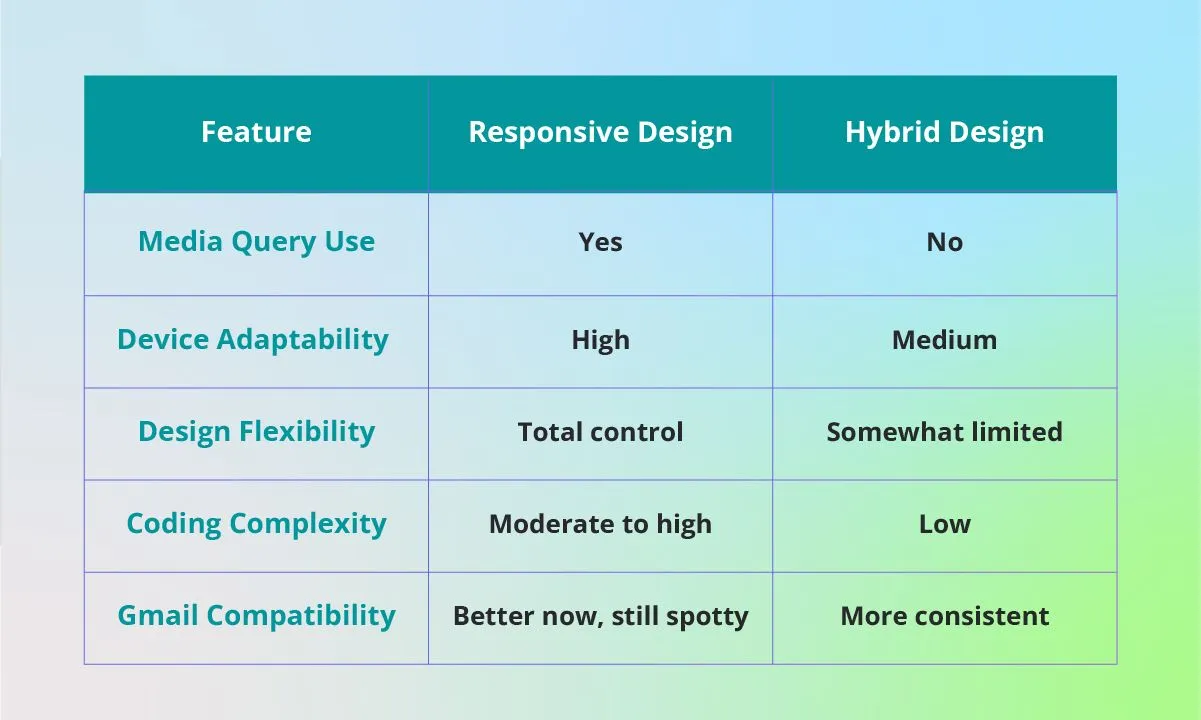
Let’s break down the pros and cons of responsive vs hybrid design with a side-by-side look.
When to Use Which
- Responsive: Go this route for marketing campaigns, brand-centric emails, or anything where design matters.
- Hybrid: Great for transactional emails or when you need speed over customization.
What About Gmail?
Gmail’s gotten better at handling responsive styles, but it's not perfect. Many designers use a hybrid + responsive combo—best of both worlds. Gmail gets something solid, and the rest of your audience gets the fully responsive experience.
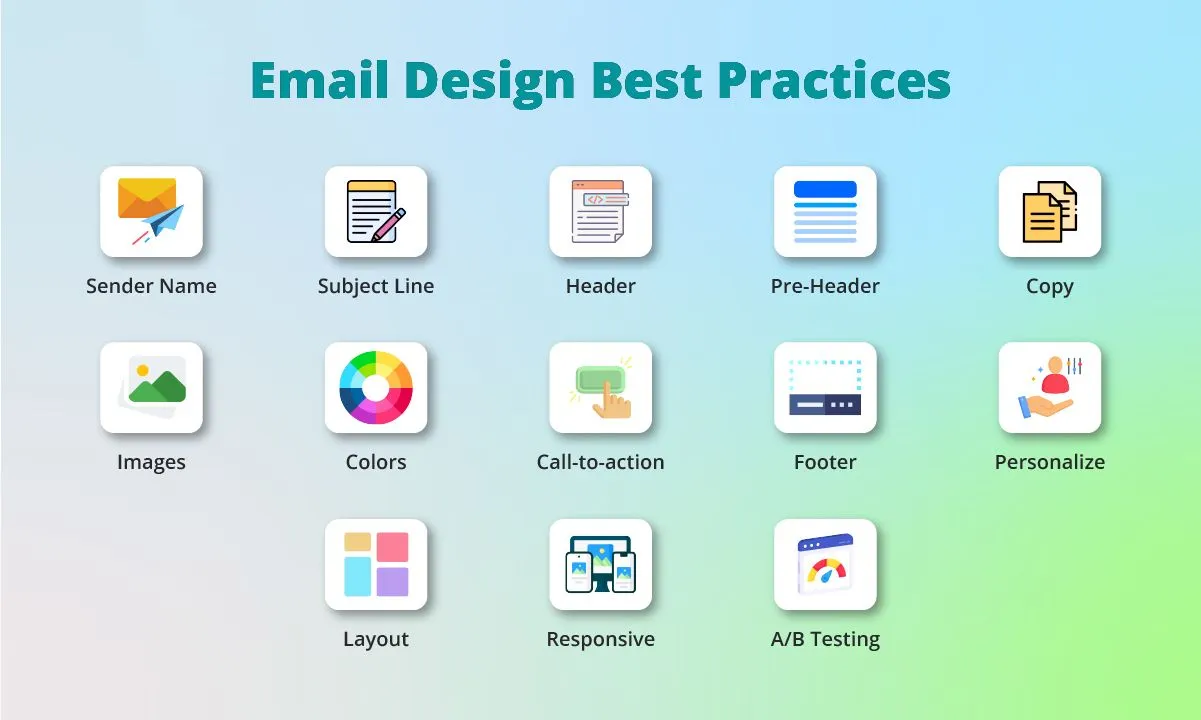
Responsive Email Design Best Practices
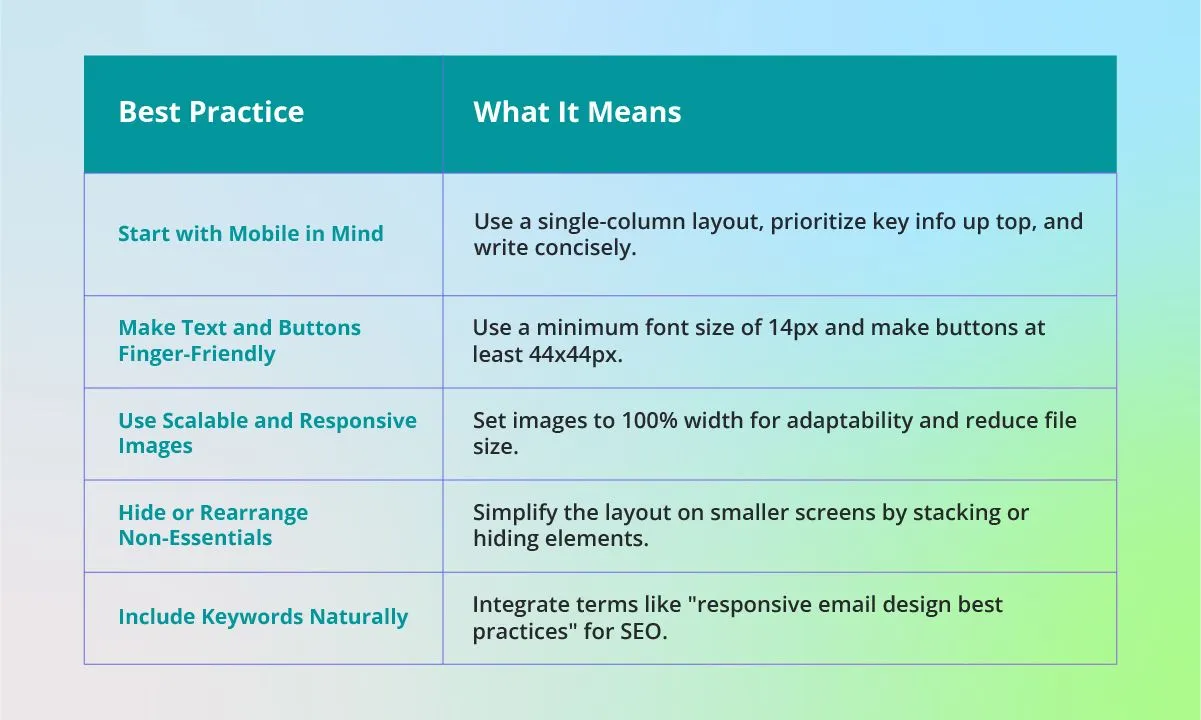
Let’s dive into some actionable best practices to help you nail your responsive designs. Here’s a handy table that summarizes the key tips you’ll want to follow:
Responsive Email Design and Coding Basics
Creating a truly responsive email starts with understanding the nuts and bolts of how email coding works. While tools make things easier, a bit of coding knowledge gives you more control and flexibility.
HTML Structure for Responsiveness
Email HTML is its own beast—it’s not quite like web HTML. Most email designs rely on nested HTML tables to control layout because many email clients still don’t fully support div-based layouts.
To make your email responsive:
- Use a single wrapper table with a fixed width (e.g., 600px).
- Nest internal tables inside for sections like headers, content blocks, and footers.
- Always define widths in percentages for mobile-friendly behavior.
Avoid relying solely on <div> tags—while modern clients like Apple Mail support them, older ones like Outlook can break your layout.
CSS Media Queries: What They Do
Media queries are the magic behind responsive design. They allow your email to apply different styles depending on the screen size or device type.
Example:
@media only screen and (max-width: 480px) {
.container {
width: 100% !important;
}
.mobile-hide {
display: none !important;
}
}
This snippet tells your email: “If the screen is smaller than 480px, make the container full-width and hide any element with the class mobile-hide.”
Inline Styles and Email Client Compatibility
Here’s a quirk of email design: many clients strip out or ignore <style> tags altogether. That’s why inline styles are crucial.
Instead of writing:
<p class="headline">Hello!</p>
Use:
<p style="font-size: 18px; color: #333;">Hello!</p>
Inline styles help maintain visual consistency across Gmail, Outlook, Yahoo Mail, and more. Tools like Premailer or email builders like Stripo automatically inline your CSS for you.
If you’re aiming to improve your responsive email design and coding skills, start by mastering HTML table layouts, inline styling, and media queries. These three pillars will make your emails not just look good—but perform reliably, too.
Stunning Responsive Email Design Examples
If you’re looking for inspiration to take your responsive email game to the next level, these real-world examples show how top brands are nailing the mobile experience with thoughtful design. A great responsive email doesn’t just shrink to fit—it adapts with purpose, making the most important content pop on smaller screens while maintaining an engaging layout across all devices.
Real Examples with Mobile Analysis
- Airbnb – Their emails are a masterclass in minimalist, responsive layouts. With generous white space, bold imagery, and large call-to-action (CTA) buttons, the design scales beautifully from desktop to mobile. On smaller screens, images stack cleanly, and navigation is simplified to prevent clutter.
- Trello – Trello sends regular updates that prioritize content blocks with generous padding and simple hierarchy. On mobile, they use collapsible content blocks that keep the layout digestible, while keeping brand colors and icons intact.
- Spotify – Spotify’s promotional emails maintain a sleek, dark aesthetic with vibrant CTAs. Responsive scaling ensures that text and album artwork remain legible and prominent on mobile devices, preserving the immersive feel of their branding.
- Headspace – Their use of whitespace, cheerful illustrations, and calming color palettes translates well across devices. On mobile, the layout collapses neatly into scrollable sections, making it easy for users to focus on one concept at a time.
- Duolingo – Known for its playful tone, Duolingo’s emails are as colorful and quirky as the app itself. They adapt well on mobile by using bold headers, stacked content cards, and visually engaging progress tracking elements.
What Makes These Designs Work?
Here’s why these brands consistently create standout responsive email design examples:
- Content prioritization: They lead with what matters most—whether it’s a compelling message or a CTA. This ensures mobile users don’t have to scroll endlessly to find the value.
- Readable fonts and touch-friendly elements: Typography is large and clear, and buttons are sized just right for taps and swipes.
- Optimized imagery: Images are compressed for fast loading, and they scale without distorting or breaking layouts.
- Adaptable templates: These brands rely on mobile-first or mobile-optimized templates that anticipate design shifts for various screen sizes.
If you’re just starting out or want to refresh your approach, study these examples as a benchmark. They prove that using a thoughtfully crafted responsive email design template doesn’t mean sacrificing creativity—it means making smarter design choices that work anywhere your audience reads them.
Future of Responsive Email Design
The email landscape is evolving fast. Responsive design today goes beyond just shrinking content.
Rise of AMP and Interactive Emails
AMP for email allows users to interact directly inside their inbox—think carousels, forms, and product cards. It’s the next frontier for engagement.
Dark Mode Optimization
More users are switching to dark mode. That means your emails need to be legible and stylish whether the screen is white or black. Use transparent PNGs, avoid pure black backgrounds, and always test.
From Responsive Email Design 2018 to Now
Back in 2018, mobile design was still catching on. Today, it’s a standard. The shift from “responsive” being a trend to a necessity is one of the biggest evolutions in email marketing.
Conclusion: Responsive Emails Are No Longer Optional
To wrap things up: responsive email design isn’t just a best practice—it’s a baseline requirement. From better user experience to increased conversions, the benefits are clear.
So whether you’re designing your next campaign or reworking your entire strategy, now’s the time to go responsive. With the right tools, training, and mindset, your emails will not just reach your audience—they’ll resonate.
FAQs: Quick Answers About Responsive Email Design
What is responsive email design?
Responsive email design is a technique where emails automatically adjust layout, font size, and images to look great on any screen—whether mobile, tablet, or desktop.
Why is responsive email design important?
Because over half of all emails are opened on mobile. Responsive design ensures a better user experience, higher engagement, and improved deliverability.
What are the best tools for responsive email design?
Top tools include Mailmunch, Mailerlite, Mailmodo, Stripo, and Litmus. Choose based on your experience level and campaign goals.
Do I need to know code to create responsive emails?
Not necessarily. Drag-and-drop editors let you build mobile-friendly emails without touching code. But knowing HTML/CSS can give you more control.
Where can I find great responsive email templates?
Look into Mailmunch’s template gallery, Stripo, or marketplaces like ThemeForest. Many ESPs offer built-in mobile-optimized templates.