Gmail Reputation Data: What It Is, Why It Matters, and How to Monitor Your Reputation Now
Last updated on

For years, email marketers and senders relied on Gmail reputation data to understand how Google viewed their sending domain and IP address. A quick look at Google Postmaster Tools could show whether your reputation was High, Medium, Low, or Bad, giving you a simple way to identify potential email deliverability problems.
But that familiar system has changed.
Google has been transitioning senders from the old Postmaster Tools experience to Postmaster Tools v2. The newer version retires the traditional Domain Reputation and IP Reputation dashboards and replaces them with more actionable deliverability and compliance insights. Google explains that the old reputation data was not always easy to act on, could take time to reflect changes in sender behavior, and could give senders an incomplete picture of deliverability.
So, what does Gmail reputation data mean today? More importantly, how can you monitor Gmail deliverability when the old reputation score is no longer available?
Let's break it down.
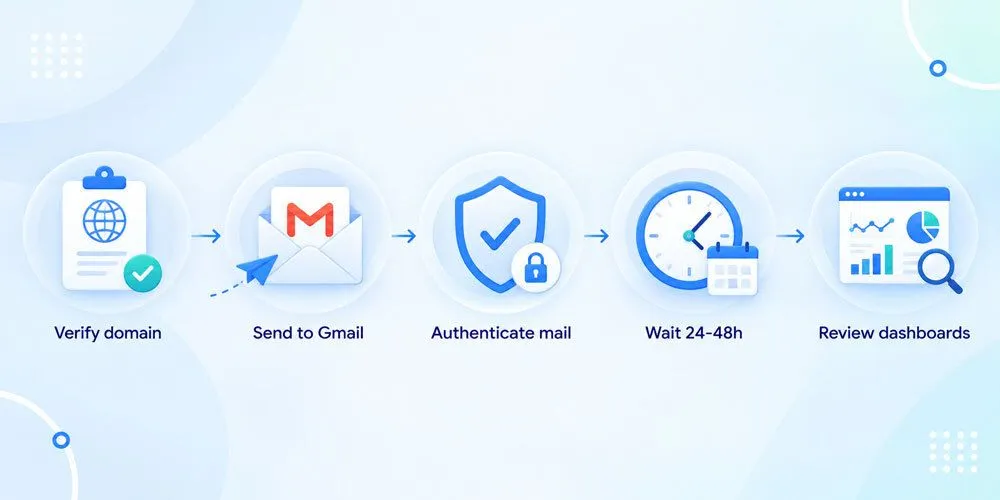
What Is Gmail Reputation Data?
Gmail reputation data refers to information that helps email senders understand how Gmail evaluates the quality and trustworthiness of their email-sending domain and infrastructure.
Historically, Google Postmaster Tools provided separate Domain Reputation and IP Reputation ratings. These ratings were based on sending behavior and were displayed as:
- High
- Medium
- Low
- Bad
A high reputation generally indicated that the sender had a history of sending legitimate email with low spam rates. A low or bad reputation suggested a history of problematic sending behavior, such as high spam levels or suspicious email activity.
However, reputation has never been the only factor Gmail considers when deciding where an email should go.
Gmail also evaluates factors such as:
- Spam complaints
- Email authentication
- Sending behavior
- Delivery errors
- Recipient engagement
- Message quality
- Sending volume
- Domain and IP behavior
- Compliance with Gmail's sender requirements
This is why losing access to a single reputation score does not mean that Gmail has stopped evaluating your sender reputation.
Gmail still evaluates your sending behavior. You simply have less access to a single number or rating that summarizes it.
Is Gmail Reputation Data Gone?
The short answer is: the old Gmail reputation score is gone, but reputation itself is not.
Google's newer Postmaster Tools experience removes the traditional Domain Reputation and IP Reputation dashboards. Google says these dashboards are being retired and replaced with newer tools designed to provide more useful and actionable information.
This distinction is important.
Your sender reputation still affects your ability to reach the Gmail inbox. What has changed is how much of that reputation Gmail exposes directly to senders.
Instead of asking:
"Is my Gmail reputation High or Low?"
You now need to ask:
"What evidence does Gmail give me about the health of my email program?"
That means paying closer attention to the data you can still access.
Why Did Google Remove Gmail Reputation Scores?
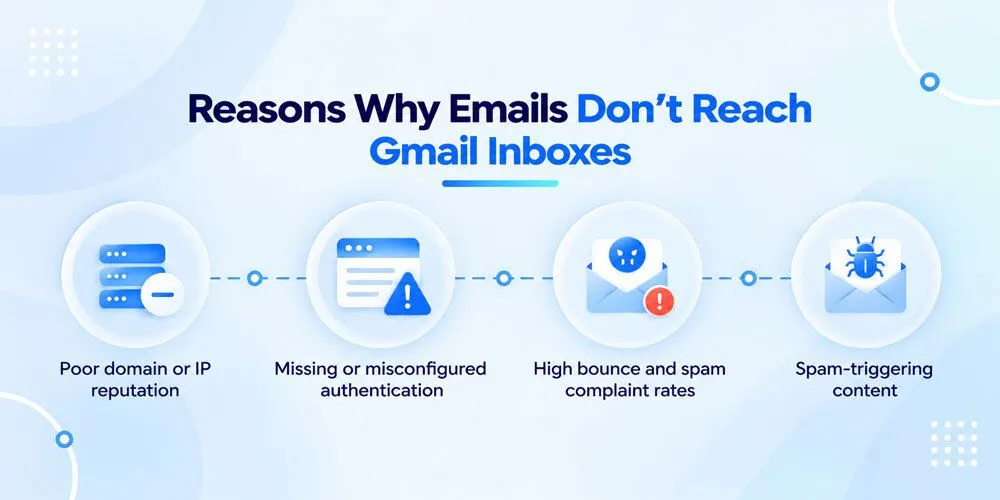
The old reputation system was useful because it was simple. However, simplicity also created problems.
Google identifies several reasons for changing the reputation dashboard.
1. Reputation data was not always actionable
Seeing that your reputation was "Medium" did not necessarily tell you what caused the problem.
For example, a sender might see a Medium reputation and still have several possible causes:
- High spam complaints
- Poor list quality
- Authentication problems
- Sudden increases in sending volume
- Low recipient engagement
- Poor acquisition sources
- Suspicious sending behavior
The rating alone could not tell you which issue needed to be fixed.
2. Reputation changes could be slow to appear
Reputation data was not real-time.
This meant that you could make a major improvement to your email program and still see the old reputation rating for some time.
Google's current Postmaster Tools documentation also notes that dashboard data is not real-time and can take time to reflect changes in sending behavior.
3. Reputation was only one part of deliverability
A good reputation does not automatically guarantee inbox placement.
Email deliverability depends on multiple signals working together.
For example, you could have historically strong sending behavior but suddenly experience delivery problems because of:
- Authentication failures
- A large increase in sending volume
- High complaint rates
- Poor list acquisition
- Delivery errors
- Changes in recipient behavior
This is why Google is moving toward more detailed diagnostic information rather than relying on one reputation score.
What Replaced Gmail Reputation Data?
Postmaster Tools v2 gives senders several other ways to understand their Gmail email performance.
Some of the most important areas to monitor include:
Compliance Status
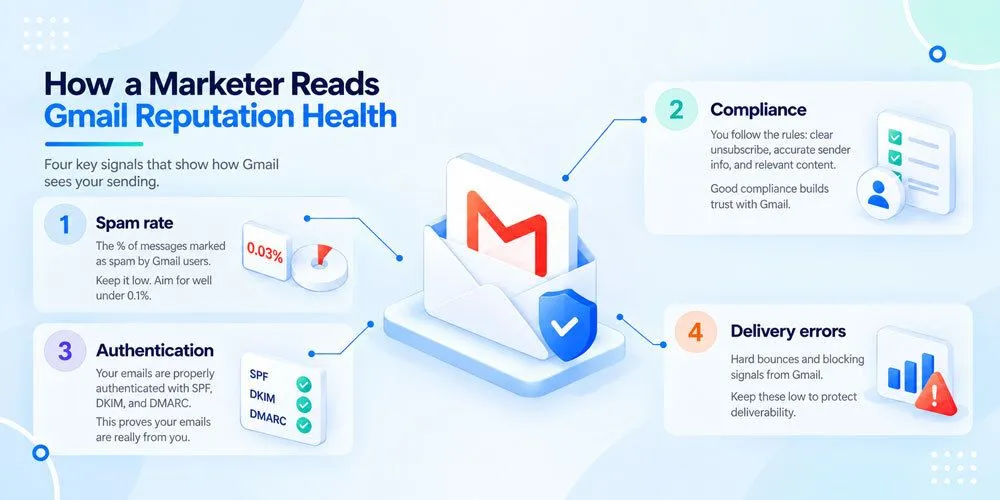
The Compliance Status dashboard helps senders determine whether their emails meet Gmail's sender requirements.
Depending on your sending setup, this can include areas such as:
- SPF authentication
- DKIM authentication
- DMARC authentication
- DNS configuration
- TLS encryption
- Message formatting
- Spam rates
- One-click unsubscribe
- Unsubscribe processing
Google recommends using Postmaster Tools to monitor compliance with its email sender guidelines.
Compliance does not guarantee inbox placement, but it can help you identify fundamental technical problems.
Spam Rate
Spam rate is one of the most important signals to monitor.
It shows the percentage of your messages that Gmail users manually mark as spam.
Google recommends keeping spam rates below its stated thresholds, and its current Postmaster Tools documentation specifically identifies elevated spam rates as a potential deliverability problem.
However, do not look at spam rate in isolation.
A low reported spam rate does not necessarily mean that your email program is healthy.
If Gmail is already sending a large portion of your messages to spam, fewer recipients will see those messages in their inboxes and have an opportunity to report them as spam.
In other words:
A low complaint rate can sometimes mean fewer people are seeing your emails, not that everyone loves them.
Authentication
Email authentication is another critical part of Gmail deliverability.
Postmaster Tools provides information about authentication performance, including:
- SPF
- DKIM
- DMARC
Google recommends properly configuring these authentication methods as part of its sender requirements.
If authentication suddenly drops, investigate your DNS records, sending platforms, configuration changes, and third-party services.
Delivery Errors
Delivery errors can help you identify problems with Gmail accepting your messages.
Look for:
- Temporary failures
- Rejections
- Sudden increases in failed deliveries
- Changes after a volume spike
- Problems affecting a particular sending stream
Your email service provider's SMTP logs can provide additional context about these failures.
Feedback Loop
Gmail's Feedback Loop can help senders understand which email campaigns or traffic categories are associated with spam complaints.
It does not provide the identity of individual people who complained. Instead, it can help you identify patterns across campaigns or message types.
For example, you may discover that complaints increase after:
- Sending to an older segment
- Increasing email frequency
- Adding a new acquisition source
- Sending a particular type of promotion
- Combining audiences that previously received different content
These patterns are often more useful than a simple reputation rating.
How to Monitor Gmail Reputation Without a Reputation Score
The biggest change for email marketers is that you can no longer depend on one dashboard to tell you whether your reputation is healthy.
Instead, you need to combine several signals.
1. Monitor Gmail-Specific Performance
Start by separating Gmail performance from your overall email performance.
Look at:
- Delivery rates
- Bounce rates
- Deferrals
- Rejections
- Spam complaints
- Opens
- Clicks
- Unsubscribes
- Conversions
If Gmail performance is declining while other mailbox providers remain stable, investigate Gmail-specific factors.
If performance is declining everywhere, the problem may be related to your overall sending strategy.
2. Compare What Changed
When deliverability drops, don't immediately assume that Gmail changed something.
First ask:
What changed in my email program?
Look at changes in:
- Sending volume
- Sending frequency
- Audience size
- Audience source
- Email content
- Sending domain
- Sending IP
- Authentication
- Email service provider configuration
- Suppression rules
- Segmentation
- Transactional and marketing traffic
For example, if your Gmail engagement dropped immediately after importing a large inactive list, the list is a much stronger place to investigate than an invisible reputation score.
3. Monitor Spam Complaints
Complaints are one of the clearest negative signals available.
Even a relatively small increase can become significant when multiplied across a large email list.
To reduce complaints:
- Send only to people who have opted in.
- Set clear expectations when people subscribe.
- Avoid sending more frequently than expected.
- Make unsubscribing easy.
- Remove or suppress consistently inactive contacts.
- Segment your audience.
- Avoid misleading subject lines.
- Keep promotional emails relevant.
Google's own guidance recommends sending only to recipients who want your messages, confirming email addresses, making unsubscribe easy, and periodically reviewing inactive recipients.
4. Check Authentication Regularly
Make sure your:
- SPF records are configured correctly.
- DKIM signing is working.
- DMARC is properly configured.
- Sending services are authorized.
- DNS records have not been accidentally changed.
Authentication problems can create deliverability issues even when your email content and audience are otherwise healthy.
5. Monitor Sending Volume
Sudden changes in sending volume can be a warning sign.
For example, imagine a company normally sends 20,000 emails per day and suddenly sends 300,000.
Even if those emails are legitimate, such a dramatic change deserves investigation.
Instead of making huge jumps, build sending volume gradually and maintain predictable patterns whenever possible.
6. Pay Attention to Engagement
Engagement is not a perfect measurement of sender reputation, but it can reveal important changes in audience behavior.
Monitor trends in:
- Opens
- Clicks
- Replies
- Website visits
- Purchases
- Unsubscribes
- Spam complaints
If engagement declines consistently, investigate why.
It could mean that your audience is becoming less interested, your content is less relevant, your sending frequency is too high, or your emails are reaching spam more often.
What Should You Do If Gmail Deliverability Drops?
If your Gmail deliverability suddenly declines, avoid making random changes.
Instead, follow a structured troubleshooting process.
Step 1: Identify the exact problem
Determine whether your emails are:
- Being rejected
- Being temporarily deferred
- Landing in spam
- Reaching the inbox but receiving less engagement
- Experiencing problems only for certain campaigns
These are different problems and require different solutions.
Step 2: Find when the decline started
Look for the exact date when performance changed.
Then compare that date against:
- Volume changes
- New campaigns
- Audience imports
- DNS changes
- Authentication changes
- New sending infrastructure
- Changes to email frequency
- Changes in segmentation
Step 3: Check Postmaster Tools
Use Postmaster Tools to look at:
- Compliance Status
- Spam rate
- Authentication
- Delivery errors
- Feedback Loop data
- Deliverability analysis where available
Google specifically recommends using Postmaster Tools to help senders understand their email performance and meet Gmail's sender requirements.
Step 4: Check your own email data
Your email platform can often give you more granular information than Gmail.
Compare performance by:
- Campaign
- Subscriber segment
- Acquisition source
- Sending domain
- Sending IP
- Email type
- Engagement level
- Sending frequency
This can help you identify the specific part of your program that is causing the decline.
Step 5: Fix the underlying problem
Do not simply try to improve the metric.
Fix the behavior causing the metric to decline.
For example:
Problem: Spam complaints increased.
Possible solution: Review audience quality, frequency, expectations, and content relevance.
Problem: Authentication failures increased.
Possible solution: Review SPF, DKIM, DMARC, DNS, and third-party sending configurations.
Problem: Delivery errors increased after a volume spike.
Possible solution: Investigate the reason for the spike and return to a more controlled sending pattern.
Gmail Reputation vs. Email Deliverability
It is easy to use "Gmail reputation" and "Gmail deliverability" interchangeably, but they are not exactly the same thing.
Gmail reputation refers to how Gmail evaluates the quality and trustworthiness of your sending behavior.
Email deliverability refers to your ability to successfully get emails delivered to recipients and, ideally, into the inbox rather than spam.
Reputation is one factor that can influence deliverability.
Think of it this way:
Sender behavior → Reputation signals → Gmail filtering decisions → Delivery and inbox placement
But the process is not this simple in practice.
Gmail uses multiple signals to determine how it handles email. That is why you should not treat a single reputation score as the definitive measurement of your email program.
Common Gmail Reputation Mistakes to Avoid
Mistake 1: Looking for one magic score
The biggest mistake is trying to replace the old reputation rating with another single metric.
There is no single number that can explain every deliverability problem.
Use multiple signals together.
Mistake 2: Ignoring your own data
Postmaster Tools provides valuable information, but your own email platform contains important details about individual campaigns and subscriber segments.
Use both.
Mistake 3: Assuming a low spam rate means everything is fine
A low reported spam rate can be misleading if Gmail is already filtering a large portion of your email.
Look at spam complaints alongside delivery and engagement trends.
Mistake 4: Making too many changes at once
If you change your sending frequency, audience, content, infrastructure, and authentication simultaneously, you make it difficult to determine what actually solved or caused the problem.
Change meaningful variables systematically and measure the results.
Mistake 5: Blaming Gmail immediately
Mailbox providers can change their filtering systems, but your own sending behavior should be the first place you investigate.
Ask:
- Did my volume change?
- Did my audience change?
- Did my frequency change?
- Did complaints increase?
- Did authentication fail?
- Did my sending infrastructure change?
- Did engagement decline before deliverability declined?
The answers can often reveal the cause faster than speculation.
How to Improve Your Gmail Email Reputation
Even without the old reputation score, the fundamentals of good email sending have not changed.
Build a permission-based list
Only send emails to people who have agreed to receive them.
Avoid purchased lists and questionable acquisition sources.
Keep your list clean
Regularly identify inactive, invalid, and unengaged subscribers.
A smaller list of genuinely interested subscribers can be more valuable than a large list filled with inactive contacts.
Maintain proper authentication
Configure SPF, DKIM, and DMARC correctly and monitor them regularly.
Keep spam complaints low
Make your emails relevant, predictable, and easy to unsubscribe from.
Maintain consistent sending patterns
Avoid unexplained spikes in volume and frequency.
Segment your subscribers
Not every subscriber wants the same content or the same number of emails.
Use engagement and preferences to create more relevant segments.
Monitor your sending infrastructure
Keep track of your sending domains, IP addresses, authentication configuration, and email service provider settings.
Track trends instead of individual results
One campaign having a poor open rate does not necessarily indicate a reputation problem.
Look for sustained changes across multiple campaigns and segments.
Does Gmail Still Have a Sender Reputation?
Yes.
The disappearance of the old reputation dashboard does not mean that Gmail has stopped evaluating senders.
It means senders no longer have the same simple High, Medium, Low, or Bad view of that evaluation.
Google's current approach puts more emphasis on actionable signals, compliance, spam rates, authentication, delivery errors, and other diagnostics.
This may initially feel more complicated.
But it can also encourage better deliverability practices.
Instead of asking whether your reputation is "High" or "Low," you can ask more useful questions:
- Are my emails being accepted?
- Are recipients reporting them as spam?
- Is my authentication working?
- Are delivery errors increasing?
- Are recipients engaging with my emails?
- Did something change in my sending program?
- Which audience or campaign is responsible?
Those questions can lead you closer to the actual cause of a deliverability problem.
Final Thoughts
Gmail reputation data used to give email senders a simple answer to a complicated question: "Does Gmail trust my email?"
That simplicity is now gone.
But the disappearance of the old reputation score does not mean that senders have lost all visibility into Gmail deliverability.
In fact, the shift toward Postmaster Tools v2 encourages a more complete approach to email performance.
Instead of checking one reputation rating, monitor the evidence around it.
Look at your spam rate. Check authentication. Review delivery errors. Monitor engagement. Analyze your subscriber segments. Track changes in sending volume and frequency. And use Gmail's Compliance Status and other Postmaster Tools data to understand whether your email program meets Google's requirements.
Most importantly, don't treat any individual metric as the complete story.
Good email deliverability is built through consistent sending behavior, healthy subscriber relationships, strong authentication, and continuous monitoring.
The reputation score may be gone, but the signals that shape your reputation are still there. The key is learning how to read them.
Frequently Asked Questions About Gmail Reputation Data
What is Gmail reputation data?
Gmail reputation data refers to information used to understand how Gmail evaluates the quality of a sender's domain and IP address. Historically, Google Postmaster Tools displayed reputation ratings such as High, Medium, Low, and Bad.
Is Gmail reputation data still available?
The traditional Domain Reputation and IP Reputation dashboards are being retired in Postmaster Tools v2. Google is replacing the old reputation view with more actionable diagnostics and compliance information.
How can I check my Gmail reputation now?
You cannot rely on the old High, Medium, Low, or Bad reputation rating. Instead, use Postmaster Tools to monitor compliance, spam rate, authentication, delivery errors, feedback loop information, and available deliverability analysis.
Does Gmail still calculate sender reputation?
Yes. Gmail still evaluates sender behavior and uses multiple signals when making filtering and delivery decisions. The key difference is that the old reputation score is no longer the primary diagnostic available to senders.
What affects Gmail sender reputation?
Factors can include spam complaints, sending behavior, authentication, recipient engagement, message quality, sending volume, and whether your email program follows Gmail's sender requirements.
Is a low spam rate always a good sign?
No. A low reported spam rate can sometimes occur because Gmail is already filtering many messages into spam. Those messages may never reach the inbox, meaning recipients have fewer opportunities to report them as spam.
How do I improve Gmail deliverability?
Focus on permission-based list growth, strong list hygiene, low complaint rates, proper SPF/DKIM/DMARC authentication, consistent sending patterns, relevant content, appropriate frequency, and regular monitoring of Gmail and your own email performance data.