Email Signature: What It Is, What to Include, and Best Practices for Creating One

Ayesha Ejaz Last updated on

Every email you send is an opportunity to make an impression.
While most people focus on the subject line, opening sentence, and main message, there is another part of an email that often gets overlooked: the email signature.
A well-designed email signature can do much more than simply display your name and contact information. It can reinforce your brand identity, make it easier for people to contact you, build credibility, direct traffic to your website, and even encourage recipients to take a specific action.
Whether you are a business owner, marketer, freelancer, salesperson, or employee, creating a professional email signature can help you communicate more effectively and make every email feel more complete.
In this guide, we will explain what an email signature is, what information to include, how to create an effective email signature, design best practices, common mistakes to avoid, and examples you can use for inspiration.
What Is an Email Signature?
An email signature is a block of text, images, links, or other information that appears at the end of an email.
It typically identifies the sender and provides useful details such as their name, job title, company, phone number, website, and social media profiles.
A basic email signature might look like this:
John Smith
Marketing Manager
ABC Company
john@abccompany.com
+1 555 123 4567
www.abccompany.com
However, modern email signatures can be much more than a simple block of contact information. Businesses may include logos, branded colors, professional headshots, social media icons, promotional banners, booking links, event announcements, or a call to action.
In other words, an email signature works much like a digital business card. It gives recipients important information about who you are and how they can contact you.
For businesses, it can also become a consistent branding and marketing asset that appears across thousands of daily conversations.
Why Is an Email Signature Important?
Email signatures are often treated as a minor detail, but they can have a significant impact on how your emails are perceived.
A professional signature can make your communication look more polished while giving recipients convenient ways to continue interacting with you or your business.
Here are some of the main reasons why email signatures matter.
1. They Make Your Emails Look More Professional
A complete and well-designed email signature can immediately make your emails appear more credible.
Compare these two endings:
Example 1:
Thanks,
Sarah
Example 2:
Best,
Sarah Johnson
Content Marketing Manager
ABC Digital
sarah@abcdigital.com
www.abcdigital.com
The second example provides more context and makes it easier for the recipient to understand who Sarah is and how to contact her.
A professional email signature is especially important when communicating with clients, customers, business partners, prospects, or potential employers.
2. They Strengthen Brand Recognition
Every email your team sends is another opportunity to reinforce your brand.
Using consistent company colors, logos, fonts, and messaging across employee email signatures can help create a more recognizable brand experience.
Even when a recipient is not actively thinking about your company, repeated exposure to your logo and brand identity can improve familiarity over time.
For this reason, companies should avoid allowing every employee to create a completely different signature. A consistent email signature system helps create a more unified and professional appearance.
3. They Make It Easier to Contact You
One of the most practical benefits of an email signature is that it puts important contact information in one convenient place.
Depending on your role, you might include:
- Phone number
- Website
- Email address
- Office location
- Calendar booking link
- Social media profiles
- Customer support details
This saves recipients from having to search through previous emails or visit your website to find basic contact information.
4. They Can Generate Website Traffic
Your email signature can act as a subtle traffic-generation tool.
A link to your website, portfolio, blog, product page, or landing page gives recipients an easy way to learn more about you or your business.
For example, a marketing professional might include:
Read our latest guide: How to Build an Email List
A salesperson might link to a product page or booking calendar.
A freelancer might link to their portfolio.
The key is to make the link relevant to the recipient and the purpose of the email.
5. They Can Support Marketing Campaigns
Email signatures are not limited to contact information.
Businesses can also use them to promote important campaigns, events, product launches, webinars, and content.
For example, a signature might include a small banner promoting:
- A new product
- An upcoming webinar
- A limited-time offer
- A downloadable guide
- A company event
- A customer referral program
This gives your business an additional opportunity to promote relevant content without sending another dedicated marketing email.
However, promotional elements should be used carefully. A signature should support the email rather than overwhelm the main message.
What Should You Include in an Email Signature?
There is no single format that works for everyone. The right email signature depends on your role, industry, audience, and the purpose of your emails.
However, most professional email signatures should include several core elements.
Your Full Name
Your name should be one of the most visible elements of your email signature.
Use the name you normally use in professional communication. You may also include your preferred pronouns if relevant to your workplace or audience.
For example:
Emily Carter
Your name can be displayed in a slightly larger or bolder font to create a clear visual hierarchy.
Your Job Title and Company
Your professional role provides important context.
A recipient should be able to understand who you are and what you do without having to search for additional information.
For example:
David Lee
Senior Account Executive
Growth Partners
This is particularly important when communicating with new contacts, prospects, clients, and business partners.
Contact Information
Include the contact details that are genuinely useful to your audience.
Depending on your role, this may include:
- Phone number
- Website
- Business email address
- Office address
- Booking link
Avoid adding every possible way to contact you. Too much information can make the signature feel cluttered.
For international communication, including the country code in your phone number can make it easier for people in other regions to contact you.
Company Logo or Professional Photo
Visual elements can help your email signature feel more personal and branded.
A company logo is generally useful for business emails, while a professional headshot can work well for consultants, freelancers, sales professionals, recruiters, and personal brands.
The image should be appropriately sized and optimized so it does not make your signature unnecessarily large.
Social Media Links
Social media icons can help recipients connect with you or your business on other platforms.
Common options include:
- X
- YouTube
Only include platforms that are relevant and actively maintained.
There is little value in linking to a social media account that has not been updated in several years.
A Call to Action
A call to action, or CTA, tells the recipient what you want them to do next.
Examples include:
- Book a meeting
- Visit our website
- Download our latest guide
- Read our latest blog
- View our portfolio
- Register for an event
A CTA can be especially useful for sales and marketing professionals.
For example:
Want to discuss your next campaign? Book a 15-minute call.
The most effective signatures usually focus on one primary action instead of presenting recipients with too many competing choices.
Legal Disclaimers
Some businesses and industries may need to include legal or confidentiality disclaimers in their email communications.
The requirements depend on your location, industry, and the type of communication being sent.
If your business needs to include a disclaimer, keep it concise and visually separate from the main signature.
It is also important to distinguish between a standard one-to-one business email and a promotional marketing email. Email signatures do not replace the legal requirements that may apply to commercial email campaigns, such as identification and unsubscribe requirements.
7 Email Signature Examples
The best email signature depends on the sender and the situation. Here are several examples to show how different professionals can structure theirs.
1. Simple Professional Email Signature
Michael Brown
Marketing Manager
Brightline Media
michael@abc.com
+1 555 XXX XXX
xyz.com
This format is simple, clean, and suitable for most professional communication.
2. Corporate Email Signature
Jessica Williams
Director of Customer Success
Acme Technologies
Phone: +1 555 XXX XXXX
Website: xyz.com
A corporate signature may include company branding, a logo, and links to important business channels.
3. Freelancer Email Signature
Alex Morgan
Freelance UX Designer
I help growing businesses create simple, intuitive digital experiences.
View my portfolio | Book a consultation
A freelancer can use their signature to communicate their value proposition and direct potential clients to their work.
4. Sales Email Signature
Rachel Adams
Account Executive
Growth Solutions
Helping SaaS teams turn more qualified leads into customers.
Book a meeting: [Calendar Link]
Explore our solutions: [Website Link]
Sales professionals can use email signatures to support the sales process without making every email feel like a sales pitch.
5. Email Signature for a Small Business Owner
Daniel Wilson
Founder, Wilson Creative Studio
Branding and content for ambitious small businesses.
Instagram | LinkedIn
This type of signature can combine personal identity with business branding.
6. Marketing-Focused Email Signature
Nina Patel
Head of Marketing
Digital Growth Co.
New guide: 10 Ways to Improve Your Email Marketing Strategy
Website | LinkedIn | Download the Guide
A marketing-focused signature can highlight one relevant content asset or campaign.
7. Minimal Email Signature
Chris Taylor
Founder, Taylor Consulting
chris@ABC.com | XYZ.com
A minimal signature can be the best option for short, frequent conversations where a large branded block would feel unnecessary.
Email Signature Design Best Practices
Creating an email signature is relatively easy. Creating one that works consistently across different devices and email clients requires more attention.
Use these best practices to improve your design.
Keep It Simple
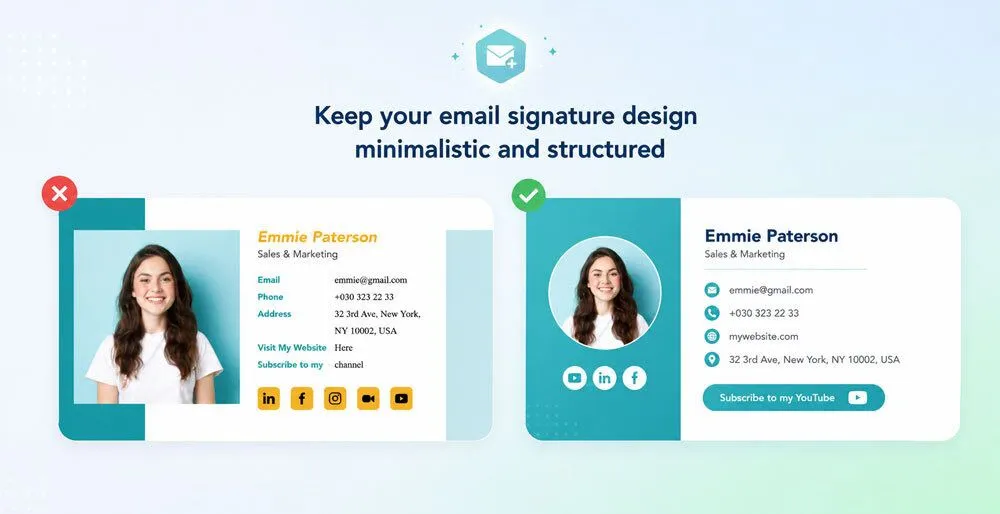
The primary purpose of an email signature is to provide useful information.
Avoid adding unnecessary graphics, multiple banners, long quotes, excessive links, or too many colors.
A clean layout is easier to read and more likely to look good across different email clients.
Establish a Clear Visual Hierarchy
The most important information should be easy to identify.
A common hierarchy is:
- Name
- Job title and company
- Contact information
- Primary CTA
- Social media links
Use font size, weight, spacing, and alignment to guide the reader's attention.
Use Your Brand Colors Carefully
Your signature should feel connected to your broader brand identity.
Use your established brand colors where appropriate, but avoid using too many colors.
One primary brand color and a neutral text color are often enough to create a polished design.
Make It Mobile-Friendly
Many people read email on mobile devices.
A signature that looks perfect on a desktop computer may become difficult to read on a smaller screen.
Test your signature on mobile devices and make sure:
- Text remains readable
- Links are easy to tap
- Images are not oversized
- The layout does not require excessive horizontal scrolling
- Contact information remains clear
Use Readable Fonts
Fancy fonts may look attractive in a design tool, but they may not be available on every device.
Use widely supported fonts such as Arial, Helvetica, Verdana, Georgia, or other common system fonts.
The goal is consistency and readability.
Optimize Images
Large images can increase the size of an email and may not load properly for every recipient.
Use appropriately sized logos and images.
Always consider what the signature looks like if images are blocked or fail to load.
Adding descriptive alt text to important images can also improve accessibility.
Use Links Strategically
Every link in your signature should have a purpose.
Avoid including ten different links simply because you can.
Ask yourself:
What is the most useful next action for the recipient?
Then make that action easy to find.
Test Across Email Clients
Email clients do not always display HTML in exactly the same way.
A signature may look different in Gmail, Outlook, Apple Mail, and other email platforms.
Before rolling out a company-wide signature, test it across the platforms your team and customers commonly use.
HTML vs. Plain-Text Email Signatures
Email signatures can be created as plain text or HTML.
Plain-Text Signatures
Plain-text signatures contain only text and basic links.
They are:
- Simple
- Lightweight
- Easy to maintain
- Less likely to have rendering problems
A plain-text signature can be a good choice for individuals who prefer a minimalist approach.
HTML Email Signatures
HTML signatures can include:
- Logos
- Images
- Colors
- Social media icons
- Buttons
- Promotional banners
- Structured layouts
They offer more design flexibility but require more careful testing.
If you create an HTML signature manually, simple table-based layouts and inline styling are often more reliable across email clients than complex web-based layouts.
For non-technical users, a dedicated email signature generator may be a more practical option.
Common Email Signature Mistakes to Avoid
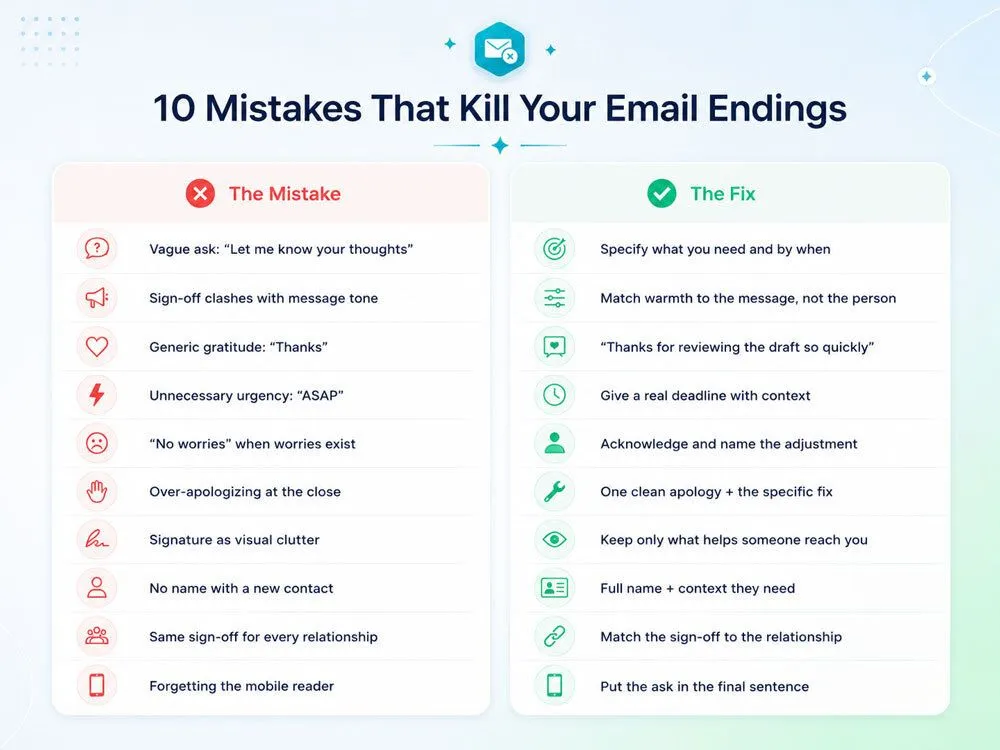
Even a well-intentioned email signature can become ineffective when it includes too much information or is poorly designed.
Here are some of the most common mistakes to avoid.
Making the Signature Too Long
A signature should not take up more space than the actual email message.
Long quotes, multiple banners, extensive disclaimers, and large images can distract from your message.
Including Too Many CTAs
When everything is presented as a priority, nothing stands out.
Choose one primary CTA and make it clear.
Using Personal Contact Information for Business
Avoid including unnecessary private information such as your home address or personal phone number in a professional signature.
Use business contact details wherever possible.
Creating Inconsistent Team Signatures
If every employee uses a different font, logo, layout, and CTA, your brand can appear disorganized.
Businesses should establish a standard signature format that employees can use consistently.
Ignoring Mobile Devices
A signature that looks good on a large desktop screen may be frustrating to use on mobile.
Always test responsive behavior before finalizing your design.
Using Low-Quality Images
Pixelated logos and stretched headshots can make your brand look unprofessional.
Use appropriately sized, high-quality assets.
Forgetting to Update Your Signature
An outdated job title, incorrect phone number, expired promotion, or old website link can create confusion.
Review your signature regularly and update it whenever your role, contact details, branding, or current campaigns change.
How Businesses Can Use Email Signatures for Marketing
An email signature can become a valuable part of a broader marketing strategy.
Because employees send emails every day, a well-managed signature can create repeated opportunities to promote relevant content.
For example, a business could use signatures to promote:
- A new blog post
- A product launch
- A webinar
- A case study
- A free resource
- A seasonal campaign
- A special offer
However, email signatures should complement your main marketing channels rather than replace them.
For larger campaigns, dedicated email marketing platforms offer significantly more control over audience segmentation, automation, personalization, analytics, and campaign performance.
A platform such as Mailmunch can help businesses create and manage targeted email marketing campaigns, automated workflows, forms, landing pages, and other tools designed to support lead generation and customer engagement.
The email signature can then work as an additional touchpoint that reinforces your brand every time someone from your team sends an email.
How to Create an Email Signature
Creating an email signature does not have to be complicated.
Follow these steps:
Step 1: Decide What Information You Need
Start by identifying the essential information your recipients need.
For most professionals, this includes:
- Name
- Job title
- Company
- Phone number
- Website
Add other elements only if they serve a clear purpose.
Step 2: Choose a Layout
Decide whether you want a simple text-based format or a branded HTML layout.
A simple signature is often the best choice for individuals.
Businesses with multiple employees may benefit from a standardized branded template.
Step 3: Add Your Branding
If appropriate, add your company logo, brand colors, and relevant social media links.
Keep the design clean and consistent with your broader brand identity.
Step 4: Add One Primary CTA
Choose a single action that you want recipients to take.
This could be booking a call, visiting your website, reading a resource, or registering for an event.
Step 5: Test Your Signature
Send test emails to different email clients and devices.
Check:
- Formatting
- Links
- Images
- Mobile appearance
- Spacing
- Font readability
Step 6: Review It Regularly
Your email signature should not be something you create once and forget.
Review it periodically to make sure all information remains accurate and current.
Final Thoughts
An email signature may appear at the very end of your email, but that does not make it unimportant.
A well-designed email signature can make your communication look more professional, improve brand recognition, simplify contact, drive website traffic, support marketing campaigns, and give recipients a clear next step.
The best email signature is not necessarily the most elaborate one. It is the one that provides the right information, reflects your brand, works across devices, and supports the purpose of your communication.
Start with the essentials: your name, role, company, and relevant contact information. Then add carefully selected elements such as a logo, social media links, or one clear call to action.
Most importantly, keep your design clean, test it across email clients, and review it regularly.
When used strategically, an email signature can turn every professional email into another opportunity to build trust, strengthen your brand, and keep the conversation moving.
Frequently Asked Questions About Email Signatures
What is the purpose of an email signature?
The purpose of an email signature is to identify the sender and provide useful contact information. Businesses can also use signatures to reinforce branding, promote content, direct website traffic, and encourage specific actions.
What should a professional email signature include?
A professional email signature typically includes your full name, job title, company name, contact information, website, and optionally a company logo, social media links, or one relevant CTA.
How long should an email signature be?
An email signature should be concise. In most cases, a few lines of essential information are enough. Avoid making your signature so large that it distracts from the main email message.
Should I include social media links in my email signature?
You can include social media links if they are relevant to your professional role or business. Only link to active profiles that you want recipients to visit.
Should an email signature include a photo?
A photo is optional. It can be useful for professionals who rely heavily on personal branding, such as consultants, freelancers, sales professionals, and executives. A company logo may be more appropriate for corporate email signatures.
Can an email signature help with marketing?
Yes. Businesses can use email signatures to promote relevant content, events, products, landing pages, and other marketing initiatives. However, email signatures work best as a supporting marketing channel rather than a replacement for dedicated email campaigns.
Should I use an email signature generator?
An email signature generator can be useful if you want to create a professional design without manually writing HTML. It can also help ensure that your signature is structured consistently across different email clients.