Emails Are More Than Just Practice: How to Test Emails Before a Campaign
Last updated on

Sending an email campaign might seem simple. You write the copy, design the email, add your links, when a link does not work, an image fails to load, or a personalized greeting displays the wrong information?
A small mistake can affect the entire campaign, leading to a poor subscriber experience, missed conversions, and unnecessary damage to your brand's credibility.
This is where test emails come in.
Test emails are more than just practice messages. They help you identify errors, check your email design, verify personalization, and make sure your campaign is ready for your audience. Whether you are sending a weekly newsletter, a promotional offer, or an important product announcement, testing your emails before sending them can help you avoid preventable mistakes.
In this guide, we will explain what test emails are, why they matter, how to send them, and what to check before launching your next email campaign.
What Are Test Emails?
Test emails are preview versions of an email campaign that you send to yourself or a small group of reviewers before delivering the final message to your subscribers.
They allow you to see how an email looks and behaves outside the email editor. Instead of relying entirely on the design preview in your email marketing software, you can inspect the actual message in an inbox and check whether its content, formatting, images, links, and personalization work as expected.
For example, imagine you are preparing a promotional email for an upcoming sale. The email includes a discount code, product images, a call-to-action button, and personalized greetings.
Before sending the campaign to thousands of subscribers, you send a test email to your own inbox. You notice that the discount code is incorrect and the call-to-action button links to an outdated page. Fixing these issues before launch helps you avoid confusing customers and losing potential sales.
Test emails are useful for almost every type of email communication, including:
- Marketing newsletters
- Promotional and seasonal campaigns
- Welcome emails
- Abandoned cart emails
- Product launch announcements
- Transactional emails
- Automated follow-up messages
- Re-engagement campaigns
The goal is simple: identify potential problems before your audience sees them.
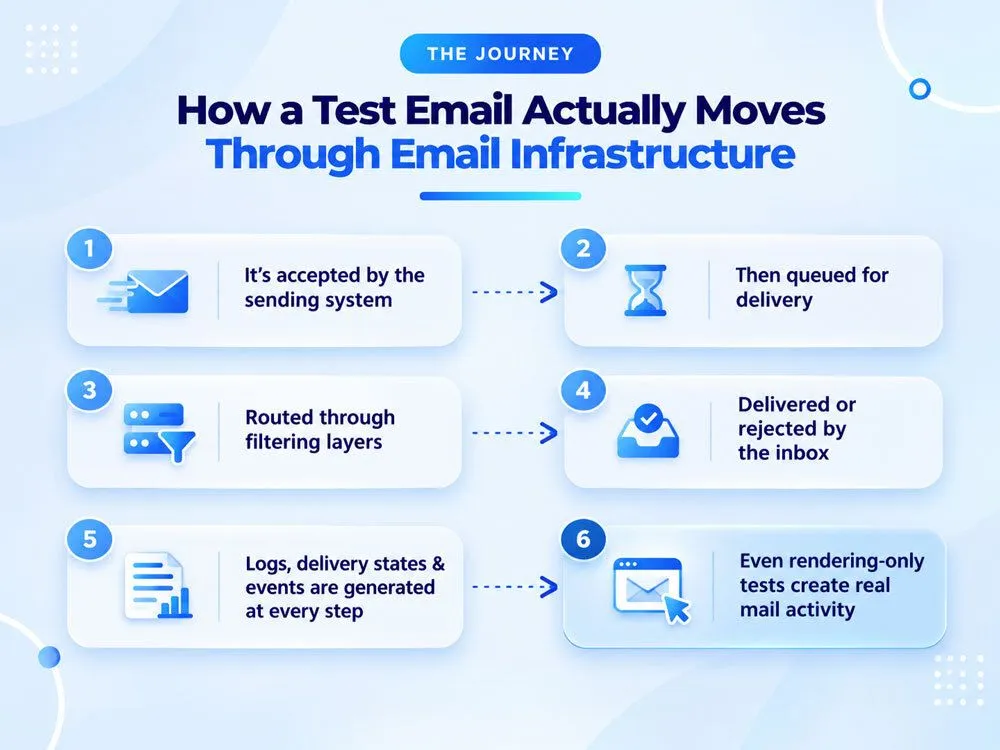
Why Are Test Emails Important?
Email testing is an essential part of building a reliable email marketing workflow. Even experienced marketers can overlook small errors when working with multiple campaigns, deadlines, and audience segments.
Here are some of the main reasons to test your emails before sending them.
1. Catch Spelling and Grammar Mistakes
Typos and grammatical errors can make an otherwise professional email look rushed. They may also create confusion when your message contains product details, pricing information, or instructions.
Reading your email in an inbox can help you catch mistakes that are easy to overlook while writing or editing.
Check your subject line, preview text, headings, body copy, and call-to-action buttons. Pay particular attention to names, dates, discount codes, and numerical details.
2. Check Email Design and Formatting
An email that looks perfect in your editor might not display exactly the same way in every inbox.
Different email clients, screen sizes, and device settings can affect how your message appears. Images may be resized, text may wrap differently, and columns may stack in unexpected ways.
Sending test emails helps you identify issues such as:
- Misaligned images or buttons
- Unexpected spacing
- Broken layouts
- Difficult-to-read fonts
- Text that extends beyond the screen
- Poor mobile formatting
A well-formatted email makes your content easier to read and helps subscribers understand what to do next.
3. Verify Links and Call-to-Action Buttons
Broken links can interrupt the subscriber journey and prevent people from completing important actions.
For example, a subscriber might click a button to shop a sale, download a resource, or register for a webinar. If the link is incorrect, the subscriber may leave without completing the intended action.
When reviewing test emails, click every important link, including:
- Call-to-action buttons
- Product links
- Promotional banners
- Social media icons
- Unsubscribe links
- Footer links
Make sure each link directs subscribers to the correct destination and that landing pages load properly.
4. Confirm Personalization Works Correctly
Personalization helps make emails more relevant to individual subscribers. Many campaigns use dynamic fields to display a recipient's name, company, preferences, or other information.
However, personalization can fail when the required data is missing or a merge tag is configured incorrectly.
For instance, a subscriber might receive a greeting that says "Hi {{first_name}}" instead of displaying their actual name.
Test emails help you identify these problems before your campaign reaches your full audience.
Where possible, test different data scenarios, including subscribers with complete profiles and subscribers with missing information. Check that fallback text works correctly when a personalization field is empty.
5. Improve the Subscriber Experience
A successful email campaign is not just about getting the message delivered. It is also about making the experience useful, clear, and convenient for the reader.
Testing helps you evaluate your email from the subscriber's perspective. Is the main message easy to understand? Is the offer clear? Can readers find the next step without searching through the entire email?
These checks help you create campaigns that feel more polished and are easier to interact with.
6. Reduce Preventable Campaign Errors
Once an email campaign has been sent, correcting mistakes can be difficult. You may be able to send a correction, but that means sending another message and asking subscribers to pay attention to something that should have been right the first time.
Test emails provide an opportunity to catch avoidable errors before launch. They cannot eliminate every risk, but they can reduce the likelihood of mistakes involving content, links, formatting, and personalization.
What Should You Check When Testing Emails?
Before sending a test email, it helps to have a consistent checklist. This makes the process easier to repeat and reduces the chance of overlooking an important detail.
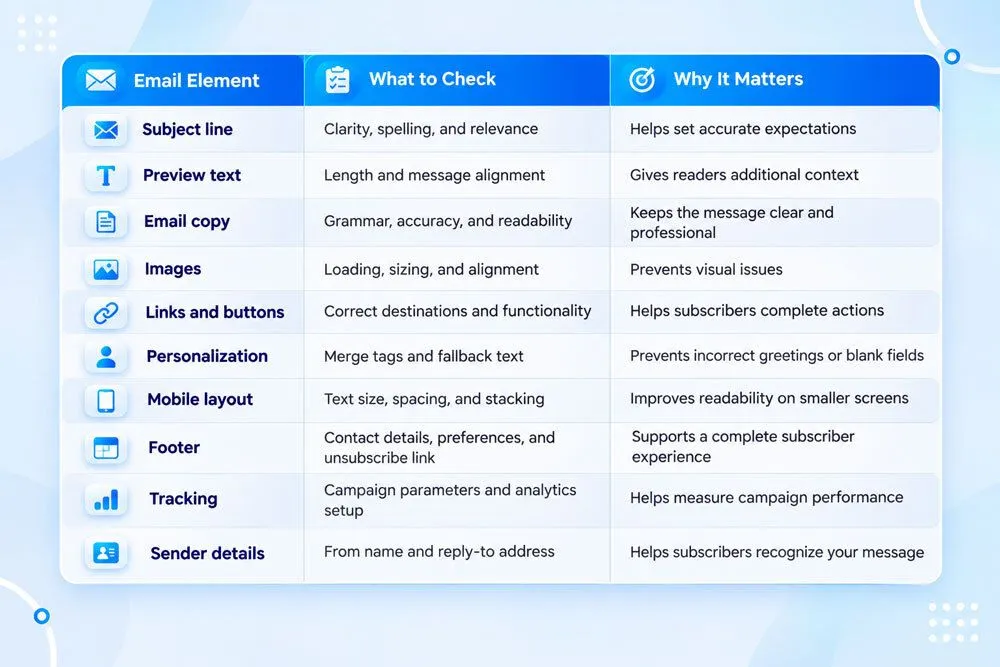
You can use this checklist for newsletters, promotional emails, automated campaigns, and other marketing messages.
How to Send a Test Email Before Launching a Campaign
The exact process depends on your email marketing platform, but most tools follow a similar workflow.
Step 1: Complete Your Email Draft
Start by writing and designing your email. Add your subject line, preview text, copy, images, links, and call-to-action buttons.
If your email includes dynamic content, make sure the personalization fields and audience conditions are configured correctly.
At this stage, your goal is to prepare a complete version of the campaign for review.
Step 2: Use the Preview Feature
Open your email marketing platform's preview option to inspect the message before sending it.
Review the overall layout, spacing, typography, image placement, and content hierarchy. If your platform supports desktop and mobile previews, check both.
Remember that an editor preview is useful but does not always replicate how the email will appear in a real inbox.
Step 3: Send a Test Email to Your Inbox
Look for an option such as Send Test Email, Send a Test, or Preview Email in your email editor.
Enter the email address where you want to receive the test message and send it.
Open the email in your inbox rather than relying solely on the editor. Check whether the subject line, preview text, sender information, images, and formatting appear as expected.
If your platform supports sending tests to multiple recipients, you can also ask a colleague to review the campaign.
Step 4: Test Links and Interactive Elements
Click the links and buttons in your test email to verify that they work.
Check the landing page destination, promotional offer, product information, and any forms or downloads included in the campaign.
If your email contains tracking parameters, confirm that the URLs are configured correctly. You can also verify that the campaign is set up to record the analytics you need.
Step 5: Review Personalization and Dynamic Content
If your email uses personalization, test the relevant fields and conditions.
A single test recipient might not reveal every possible issue. For example, a campaign that displays different recommendations based on subscriber behavior may need additional checks for different audience scenarios.
Use representative test data where your platform supports it, and verify that conditional content appears as intended.
Step 6: Check Mobile Compatibility
Open the test email on a smartphone or use your platform's mobile preview.
Look for text that is too small, buttons that are difficult to tap, images that do not fit the screen, and sections that require excessive scrolling.
Make sure the most important information is visible and that the primary call to action is easy to find.
Step 7: Make Corrections and Send Another Test
If you discover any issues, return to the email editor and correct them.
Then send another test email to confirm that the changes have resolved the problem. Do not assume a correction worked until you have checked the updated version.
Once everything looks right, you can proceed with your final campaign review and send or schedule the email.
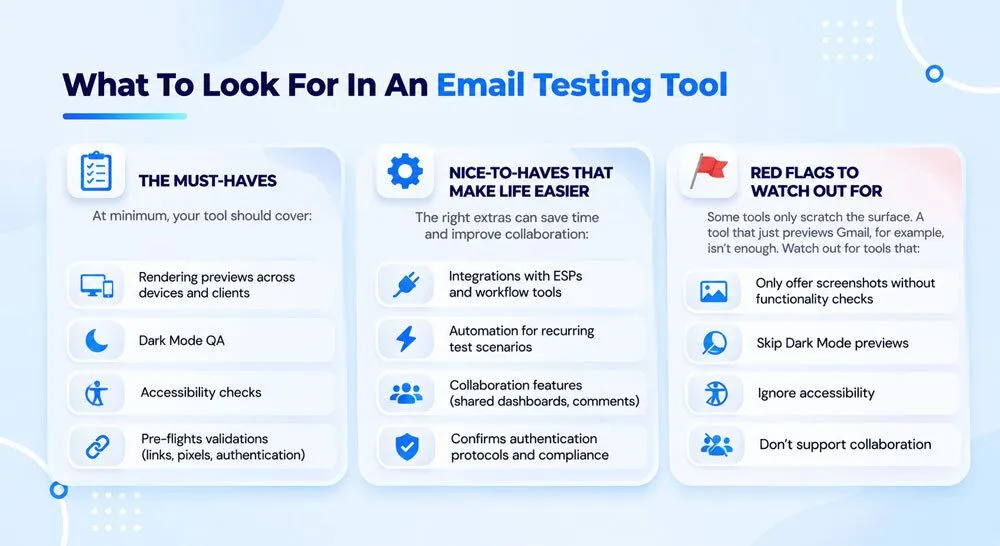
Test Emails vs. Email Deliverability Testing: What's the Difference?
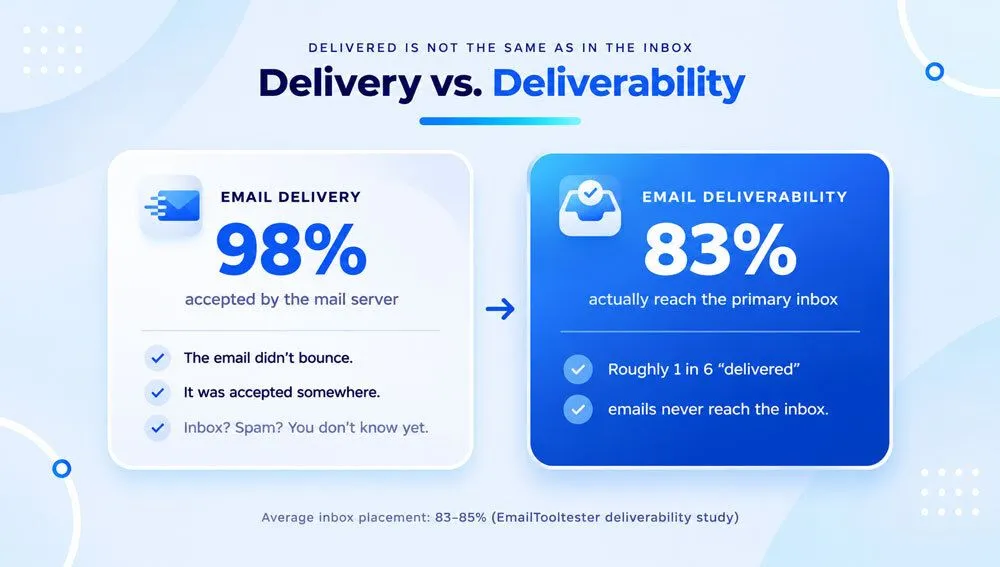
Test emails and email deliverability testing are related, but they serve different purposes.
A test email helps you review a campaign's content, layout, links, and functionality. Deliverability testing focuses on whether your email is likely to reach the intended inbox and whether technical or reputational issues could affect delivery.
Here is how they compare:
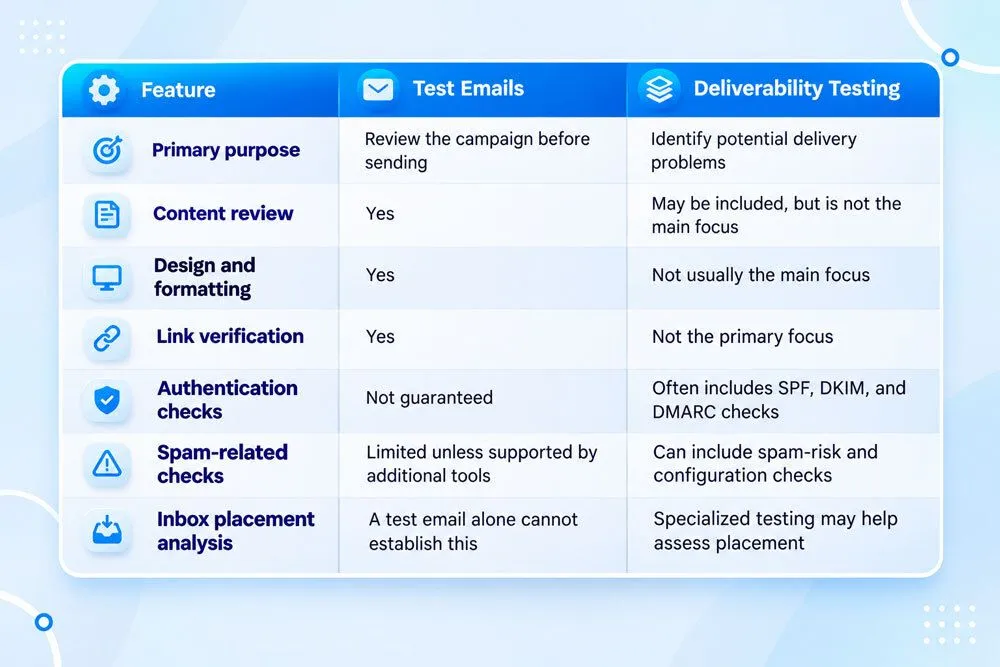
Sending a test email to your own inbox does not guarantee that the final campaign will reach every subscriber's inbox. Delivery can vary depending on sender reputation, authentication, recipient engagement, spam filtering, and other factors.
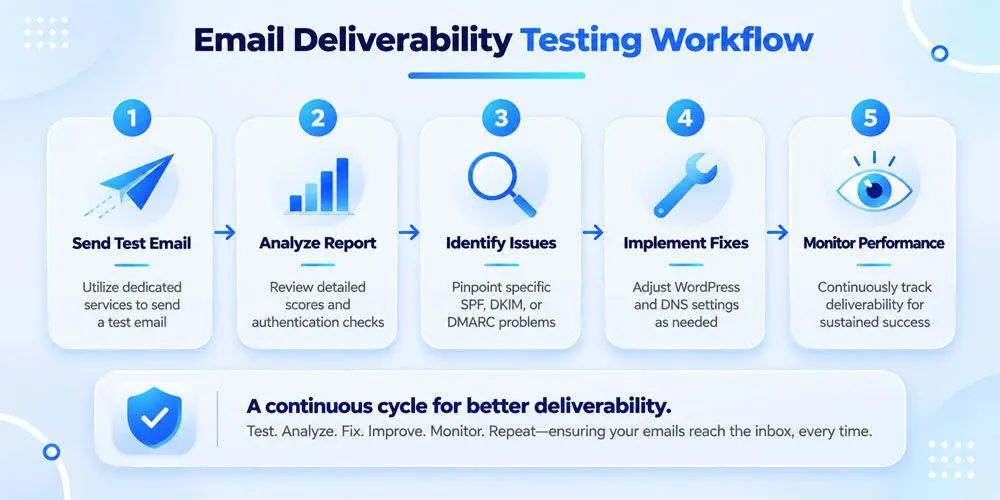
For stronger results, combine routine email testing with good list hygiene, appropriate authentication, and ongoing deliverability monitoring.
Common Test Email Mistakes to Avoid
Even when marketers test their campaigns regularly, a few common mistakes can limit the value of the process.
Testing Only the Email Design
A visually appealing email can still contain incorrect information, broken links, or faulty personalization.
Do not focus exclusively on appearance. Review the content, links, tracking, and subscriber experience as well.
Assuming One Test Covers Every Scenario
A test sent to one email address may not reveal how the campaign behaves for other recipients.
Different inbox providers, screen sizes, and subscriber data can affect the experience. Test representative scenarios based on the complexity and importance of your campaign.
Forgetting to Retest After Making Changes
If you edit your email after reviewing the test version, the previous test no longer reflects the final campaign.
Always retest meaningful changes, particularly those involving links, images, dynamic content, and layout.
Ignoring Mobile Users
A large portion of email reading happens on mobile devices, although the exact share varies by audience and campaign.
If your email is difficult to read or navigate on a phone, subscribers may abandon it before reaching your main message.
Confusing a Test Email With a Final Campaign
A test email is intended for internal review. It does not necessarily behave exactly like the final campaign in every respect.
Depending on your platform, tests may not reproduce the final audience segmentation, automated triggers, tracking, or recipient-specific content. Confirm which features your platform includes in test sends, and use any available campaign checks before launch.
Sending Tests to Real Subscribers
Unless you are deliberately running a controlled test, avoid using your actual subscriber list to review an unfinished campaign.
Send test messages to designated internal addresses or reviewers. This reduces the risk of accidentally exposing unfinished content or sending confusing messages to customers.
How Mailmunch Can Help You Test Email Campaigns
An effective email marketing workflow includes more than writing a compelling message. Marketers also need to review campaign content, confirm links, inspect design, and check that their email is ready to send.
Mailmunch provides email marketing tools that can help streamline campaign creation and preparation. Its email editor and template options help marketers build campaigns, while its preview and testing workflow can help them review the message before launch. Available testing options may vary depending on the campaign type and account configuration.
Here are a few ways to make email testing part of your Mailmunch workflow:
- Build and review your campaign: Create your email using the available editor and templates, then inspect the layout and content.
- Check the message before launch: Use the available preview and test-send options to review the email in an inbox.
- Review links and calls to action: Confirm that your buttons and URLs direct subscribers to the intended destinations.
- Check your campaign details: Verify the audience, sender information, subject line, and schedule before sending.
- Review performance after launch: Use available campaign analytics to understand engagement and identify opportunities to improve future emails.
For marketers managing recurring newsletters or multiple campaigns, a repeatable testing process can help reduce avoidable errors and support a more consistent subscriber experience.
Best Practices for Creating an Effective Email Testing Process
If you send emails regularly, testing should be a standard part of your campaign workflow rather than a last-minute task.
Use these best practices to make your process more reliable.
Create a reusable checklist. Keep a standard list of items to check before every campaign, including subject lines, links, personalization, images, and mobile formatting.
Test high-impact campaigns carefully. Product launches, major promotions, transactional messages, and time-sensitive announcements deserve additional attention because errors can have a greater impact.
Use multiple test scenarios when needed. If your email includes dynamic content, different audience segments, or complex automation, test the scenarios that are most likely to affect the recipient experience.
Check the actual inbox experience. Editor previews are useful, but receiving the test message allows you to inspect the email in a real inbox environment.
Retest after important edits. Any change to a URL, image, layout, offer, or personalization rule can introduce a new issue.
Combine content checks with technical checks. Review the email itself while also paying attention to sender authentication, list quality, and other factors that influence deliverability.
Document recurring issues. If you repeatedly encounter the same mistakes, update your email creation process to prevent them from happening again.
Final Thoughts
Test emails are more than just practice messages. They are an important quality-control step that helps marketers review campaigns, identify mistakes, and create a better experience for subscribers.
From checking subject lines and fixing broken links to reviewing mobile layouts and verifying personalization, a few extra minutes of testing can help you avoid problems that are much harder to correct after a campaign has been sent.
The next time you prepare a newsletter, promotional offer, or automated email, make testing part of your workflow. Review the message, correct any issues, and test again when necessary.
With a consistent process and the right email marketing tools, you can send campaigns with greater confidence and focus on what matters most: delivering relevant messages that encourage subscribers to engage.
Frequently Asked Questions About Test Emails
1. What is a test email?
A test email is a preview version of an email campaign sent to yourself or selected reviewers before the final message is delivered to subscribers. It helps you check content, design, links, personalization, and other campaign elements.
2. How do I send a test email?
Open your email marketing platform, complete your campaign draft, and look for a test-send option in the editor. Enter your test recipient's email address, send the message, and review it in the recipient's inbox. The exact steps vary by platform.
3. Why should I send test emails before a campaign?
Test emails help you identify spelling errors, broken links, formatting problems, incorrect personalization, and other issues before they reach your subscribers. They can improve campaign quality and reduce preventable mistakes.
4. Can I test emails on different devices?
Yes. You can open a test email on different devices and email clients to check how it displays. Some email marketing platforms also offer previews or specialized testing tools for different inbox environments.
5. Do test emails affect email deliverability?
Sending a test email does not automatically improve deliverability. However, it can help you identify certain problems before launch. You should also monitor sender reputation, authenticate your sending domain, maintain a healthy email list, and follow applicable email sending requirements.
6. How many times should I test an email?
There is no universal number. Test your campaign at least once before sending it, and repeat the process after making meaningful changes. Complex campaigns with personalization, conditional content, or multiple layouts may require additional tests.
7. Are test emails the same as A/B tests?
No. Test emails are primarily used to review a campaign before it is sent. A/B testing compares different versions of an email, such as two subject lines or calls to action, to determine which performs better with a defined audience.
8. Can test emails check whether an email will land in the inbox?
Not reliably on their own. Receiving a test message in your inbox confirms that the particular test was delivered there, but it does not guarantee that the final campaign will reach every subscriber's inbox. Specialized deliverability and inbox placement tools can provide additional insight.